2020年3月17日星期二

How to Solve SCN Coding Error”VPOGeneral Error(-12)” of Star Diagnosis Xentry Diagnostics Software

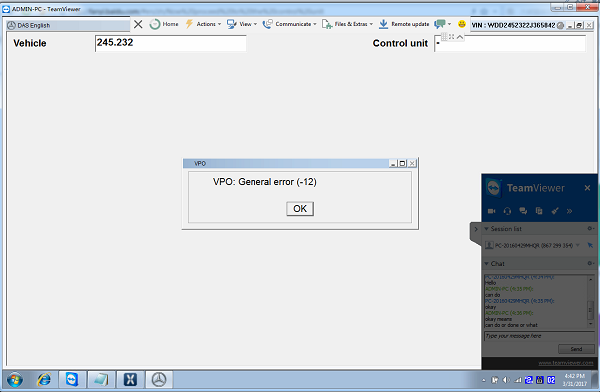
Star Diagnosis MB Star C4 V2018.12 Xentry/DAS diagnostic software support online SCN Coding for Mercedes Benz.Some client got xentry openshell xdos online coding VPO:General Error(-12). Bellow OBD2TOOL share solution of  SCN Coding“VPO:General Error(-12)”
AQ Star Diagnosis MB Star C4 SD Connect Multiplexer with Latest Xentry
star diagnosis MB Star C4
SCN Coding “VPO:General Error(-12)” Error Show:
How-to-Solve-Xentry-Diagnostic-Error-VPO-General-Error(-12)-1
Reason of this Online Coding “VPO:General Error(-12)” Error
Your Mercedes SD C4 software is too old .need to use the new profi-cd
How-to-Solve-Xentry-Diagnostic-Error-VPO-General-Error(-12)-2
First:  Download the new profi-cd software
https://mega.nz/#!bExRTCgZ!V8nWW-23XV3TFyc80-8Gg4oFeJn_RBSaBlUjDqdRnb8
Second,install the new profi-cd as following guide
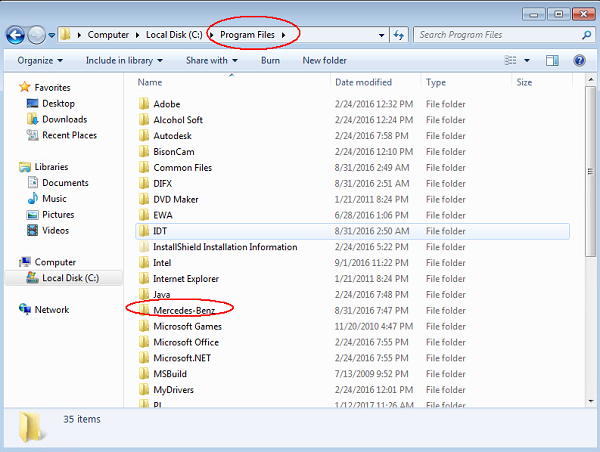
1.Go to >>Computer>>Local Disk(C)>>Program Files
How-to-Solve-Xentry-Diagnostic-Error-VPO-General-Error(-12)-3
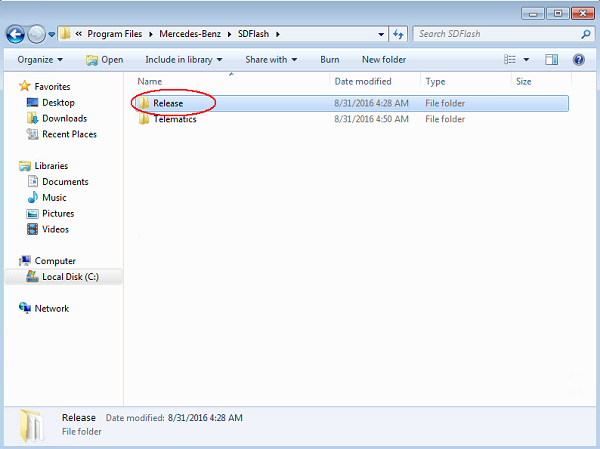
2.Open file>>Mercedes Benz>>SDflash
How-to-Solve-Xentry-Diagnostic-Error-VPO-General-Error(-12)-4
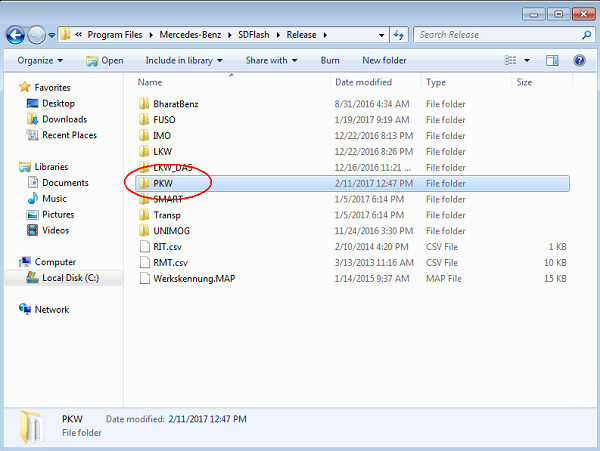
3.Open file Release
How-to-Solve-Xentry-Diagnostic-Error-VPO-General-Error(-12)-5
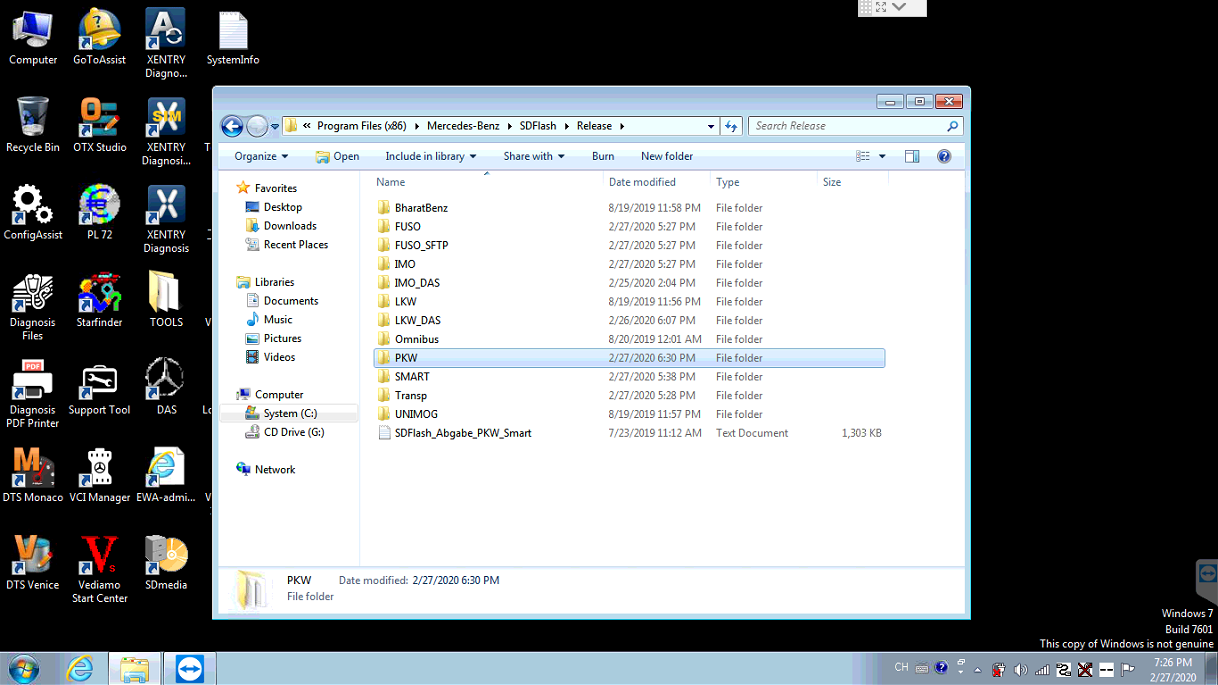
4,Open file PKW
How-to-Solve-Xentry-Diagnostic-Error-VPO-General-Error(-12)-6
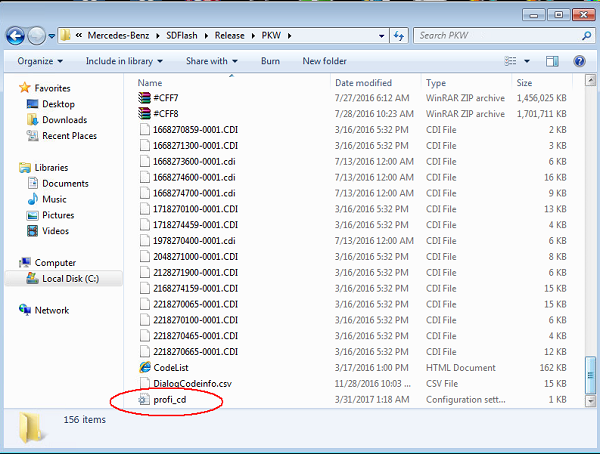
5.Delete the Old file “profi-cd” and replaced by the download new one
How-to-Solve-Xentry-Diagnostic-Error-VPO-General-Error(-12)-7
Enjoy it .

MB-Star Diagnostic XENTRY Software “A fault has Occured” Solution

What is MB Star Diagnostic?
Mercedes-Benz Scanner MB Star Diagnostic help you read and erase fault codes from any control unit in your Mercedes-Benz.If MB–Star Diagnostic works functionally, you can achieve a lot of things like reading the actual configurations in each system, streaming real time sensor data and etc.
What will happen if Diagnostic XENTRY Software is outdated?
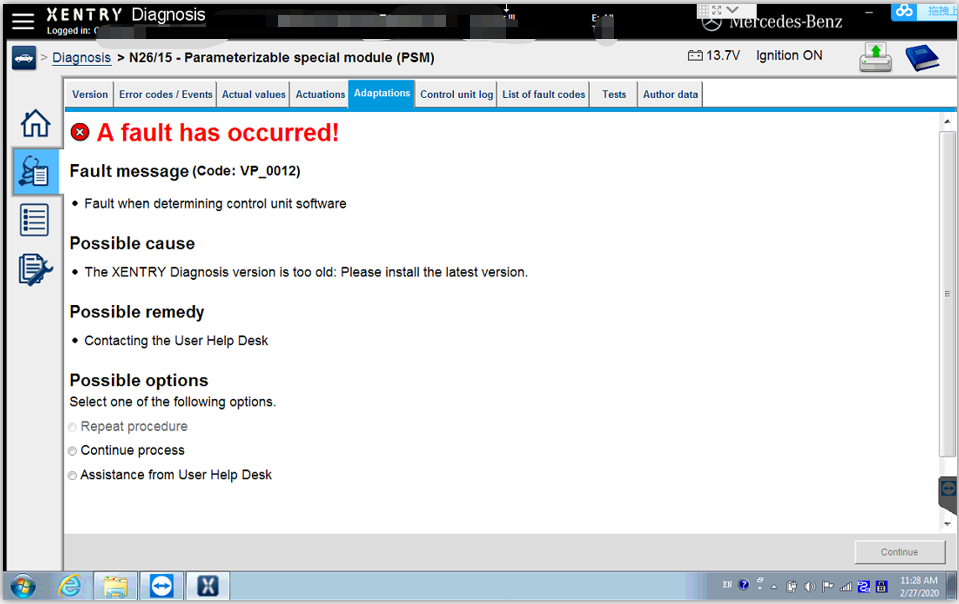
However, sometimes you may forget to update MB–Star Diagnostic version. Or maybe you just don’t know why the error “A fault has occured!”below will occurred.Here offers your desired solution!
MB-Star-Diagnostic-XENTRY-Software-solution-step-1
What can you do to update MB–Star Diagnostic version?
In normal cases,you can change MB-Star Diagnostic version to address the problem for MB-Star Diagnostic of 2018/2019 version.
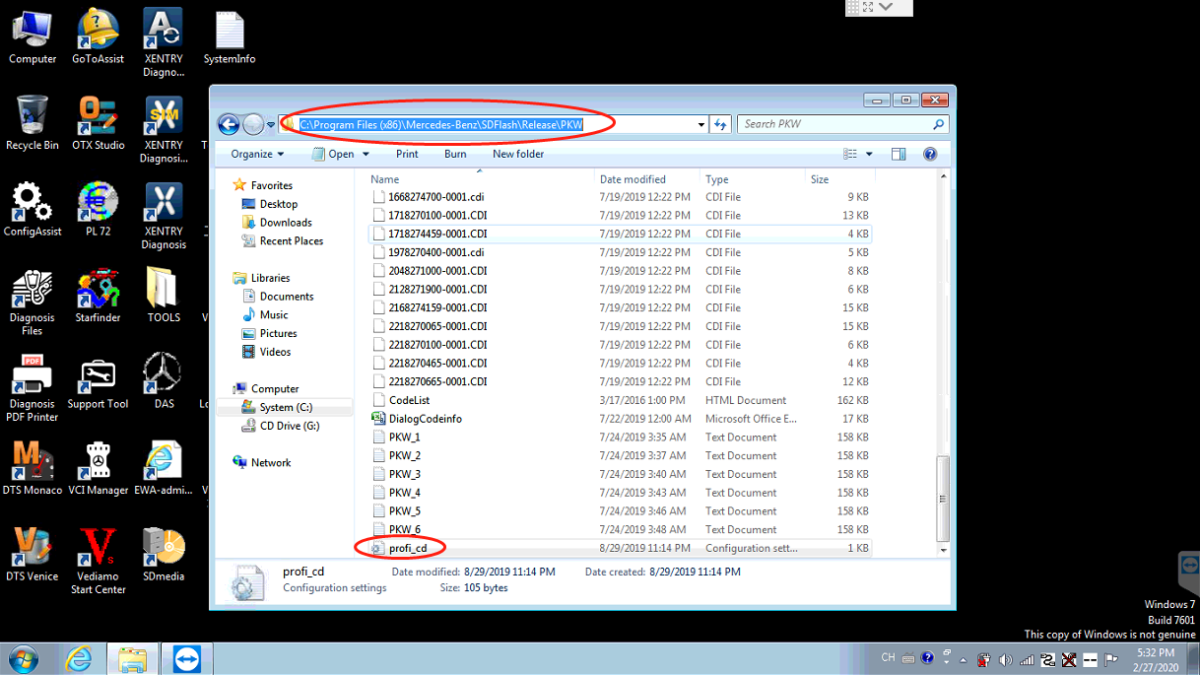
The targeted file is in C:\Program Files (x86)\Mercedes-Benz\SDFlash\Release\PKW.Notice:if you have already input your account info, you don’t need to exit.
MB-Star-Diagnostic-XENTRY-Software-solution-step-2
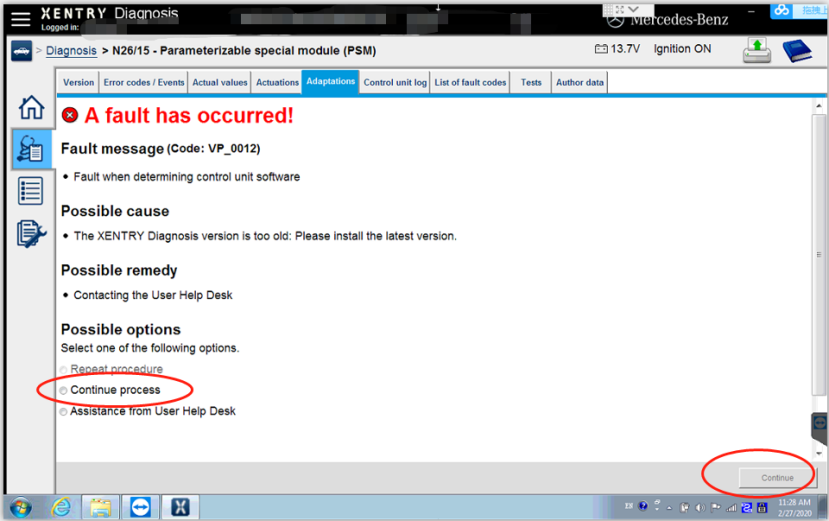
After that, please double click the file, update it to the latest file and save it. At last, you can open the file and choose “Continue process”, then choose “continue”.
MB-Star-Diagnostic-XENTRY-Software-solution-step-5
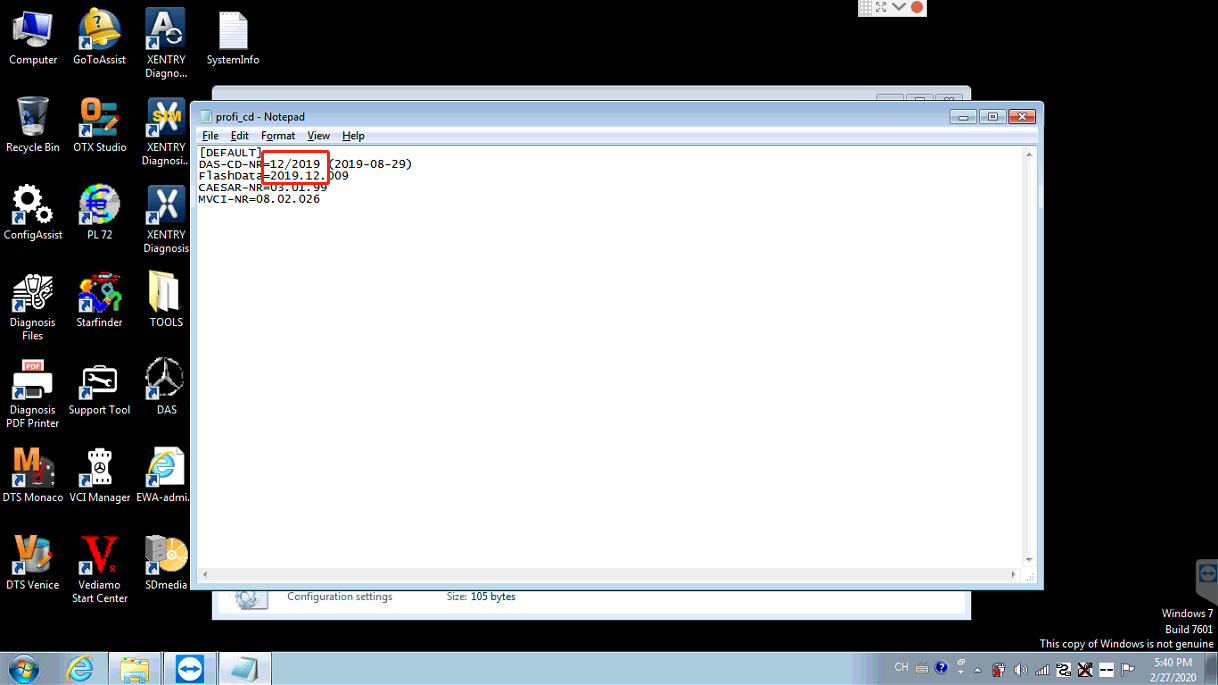
During this process,please check the red circled ones and update MB–Star Diagnostic to the latest version.
ex.if the latest MB–Star Diagnostic is of 2019/12,you can change the date to its responding ones.
MB-Star-Diagnostic-XENTRY-Software-solution-step-4
But what if the same error showing “A fault has occured” keeps popping up?As you may see in the method:C:\Program Files (x86)\Mercedes-Benz\SDFlash\Release\PKW, PKW means the car type.
MB-Star-Diagnostic-XENTRY-Software-solution-step-6
So in this case, you need to make sure your car’s type.
If your car is a Fuso,please open the profi_cd file in the FUSO folder and update MB XENTRY Diagnose to the latest version. If your car is a SMART, you can open the profi_cd file in the SMART folder and update it to the latest version.
MB-Star-Diagnostic-XENTRY-Software-solution-step-3
Still totally have no idea about where to find the right file of MB–Star Diagnostic? Why not open Release in C:\Program Files (x86)\Mercedes-Benz\SDFlash\Release. You open every file in release folder and update every file.

2020年3月5日星期四

Why You Choose Autel MaxiAP AP200

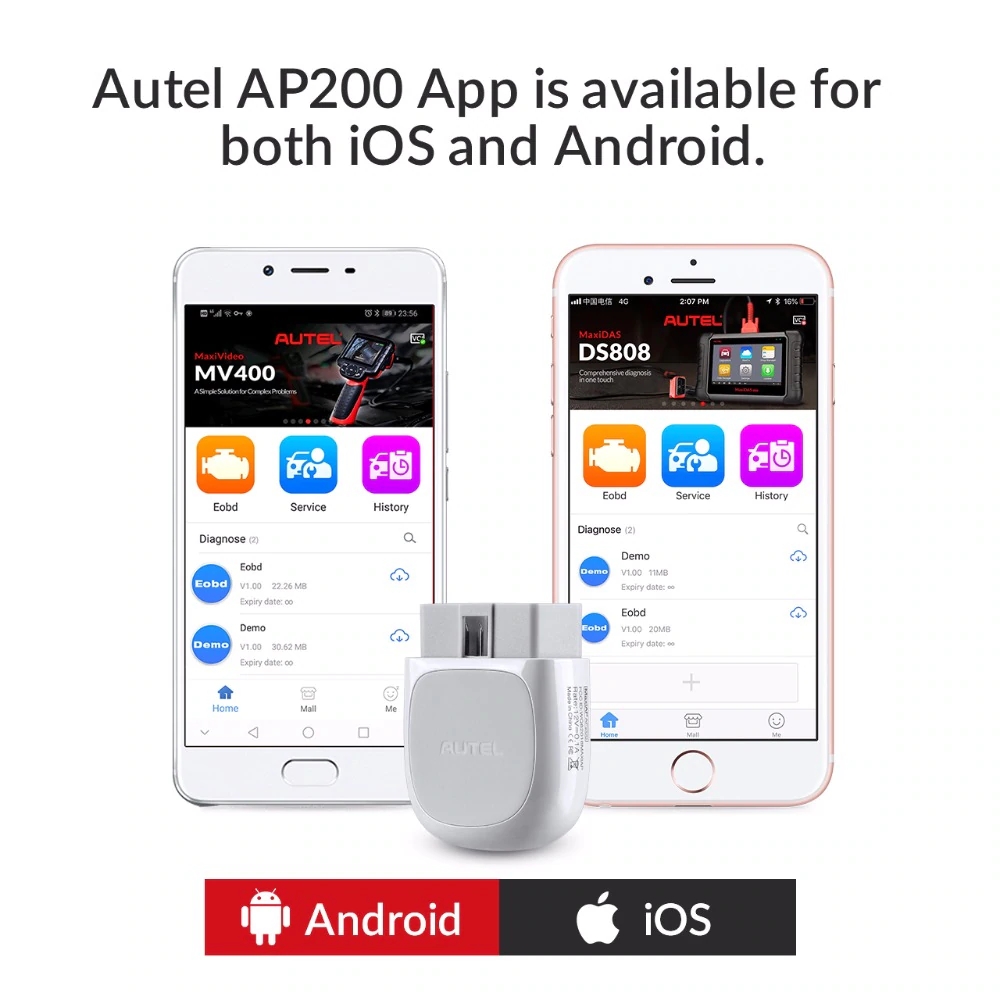
Tell you a small magic scanner: Autel MaxiAP AP200. It is the perfect Do-It-Yourself tool for customers looking for quick and easy diagnostic functions of all systems.
why-you-choose-autel-maxiap-ap200
Review 1: Work great
Works great! I bought it for my friend, and he likes it very much. He told me that he was attracted by its dynamic display. It’s fortunate to buy this at such a reasonable price, after all, most car diagnostic tools with full systems diagnoses and various service functions have a high price. Once he got the Bluetooth scanner connected to his android tablet, he got quick access to boundless options and information, which can be saved as PDF files and be reviewed.
It has TPMS, BMS function and etc. You can use BMS to clear the fault messages of the original battery to re-adapt the replaced battery which is helpful for me.
It comes with an AP200 which can work perfectly with the Bluetooth device. he never needs to worry about the problems related to the compatibility.
This Autel scanner also supports up to 19 specific functions, including oil reset, DPF, EPE, and etc, it really worth to buy one.
Review 2: Found out what was causing the error light on truck
I bought this for my dad to use on his 2007 Chevy Silverado. He’s had the check tire lights on for years now. I remember him saying he took it to the shop soon after they came on and was quoted something ridiculous to get the sensor replaced as there wasn’t anything actually wrong with the tires themselves. Plugged in the OBD2 scanner and it found the error right away and he was able to reset the light so that was pretty cool to watch. Gonna miss that little yellow light ??
The app took a bit to get set up, but once it was all said and done it was really easy to run through the process of scanning the truck and resetting the codes.
Review 3: Program Honda keys and so much more
I was very skeptical if a $60 device could actually do what a $500 to $800 code scanner could do. I purchased it to program keys to a new ECU on a 2002 Honda Civic. It was a bit confusing to set up at first, but once I paid the $15 fee for a Honda, it worked perfectly. Sure beats paying $140 to have a dealer spend 10 minutes to program keys. It does so much for $50. The only downside is the $15 per year per vehicle make. But if you only own Hondas, that works well. Bummer I own a BMW, Toyota, Isuzu, Mazda, Subaru, and Honda. That’s $90 a year for all of them.
Review 4: ?Multifunctional obd2 scanner
In comparison with other Bluetooth code readers, this AP200 provides me with a more comprehensive range of features. A number of reset services are supported, which include Oil reset, EPB reset, BMS reset, etc.
Review 5: Good scanner and Worth to buy
It’s a Bluetooth scanner to smartphone. Considering, it keeps the ability of the scan tool and is pretty impressive. You scan the QR code on side to download the software. OBD2 software is free for a vehicle. If you are just doing a couple of vehicles, it’s pretty reasonable because you just need to pay for the software user’s permission for the other vehicle.
After setting this scanner up, it’s light will turn into blue once it connects to the Bluetooth in your smartphone.
There is automatic selection for selecting diagnostic type which can help you scan your vehicle very fast. Turn the key on and choose a diagnostic type, it is easy to use. After confirming vehicle profile and clicking the yes button, the scan tool will establish vehicle communication. You can click auto scan bottom on diagnostic menu and this scanner will start to scan your vehicle. It will scan your powertrain, anti-lock brake system tire pressure monitor and ect..
This AP200 also supports live data, like ATC, live data, engine live data and transmission live data. You can click engine speed in engine data part and then click graft, just click back, the graft will be shown under the engine speed.
Generally speaking, it works fairly fast and worth to buy.

Is possible to change idle speed with GM Tech II

Possible to raise and lower idle speed using a Tech II scanner?
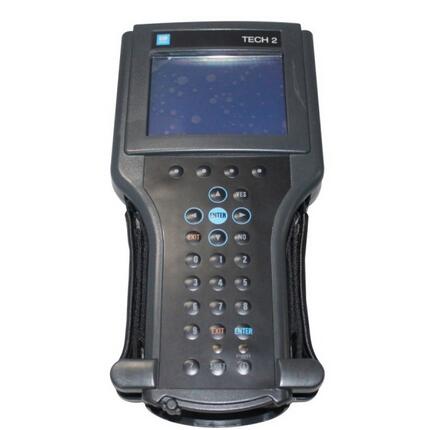
GM-Tech-II
Look here – questions and answers from users and technicians
2003 escalade, found a TSB regarding rough idle, I need to raise and lower the idle by +/- 50 rpm. How do I do this with a Tech 2?
For the 2003, if the tsb refers you to a new calibration you might able to reprogram with tis2000 (depends on the tsb date).
Note that things can’t be done with the scan tool alone.
2011 escalade would like to know how to do a VIN reprogram/ relearn for the radio.
For the 2011 you’ll need tis2web.
Note that things can’t be done with the scan tool alone.
Is it possible to adjust the idle rpm with the Tech II?
You cannot change your idle rpm with the Tech 2. On some vehicles you can raise and lower the rpm by controlling the iac motor, but only for diagnostic purposes.
What do I need to be able to change my idle speed for cold conditions . ECM program adjustment? should be able to control it with cruise control switch correct?2002 GMC duramax 2500HD . (1GTHC23182F202689 – 2002 GMC VIN.)
your vehicle can the ecm reprogrammed for the fast idle increase. your local dealer should be able to help you out.
Which one Tis2000 will support escalade 2009 to reprogram with Tech2?
For 2009 you will need an online subscription.
I’m trying to change the idle speed on a 98 camro m6, ls1, with a big cam for a friend of mine.
Can anyone enlighten me as to the proper procedure to adjust it with a GM tech 2? He wants it specifically set with the ecm.
You cannot do it with a TECHII. Simple as that. What you want to do is considered editing, and you cannot edit with a TECHII. Period.
Only thing you can do with a TECHII is upload GM specific files, tunes, updates, whatever you want to call them.
Raising of the idle can be done using the bi-di controls in the scanner function, but it does not burn it to the memory.
Drilling a hole in the T-body does you no good, because without raising the idle in the tune, the IAC will just close up more, trying to get the idle back down to the desired speed.
I assume the same is true for changing the rear gear ratio?
You can change gear ratios by changing RPOs. Totally different thing. Thats still not editing. It’s changing what the computer thinks the car came with from the factory.
You cannot tell the computer the car has a 4.56. You cannot change the idle.
To correctly change the idle, you need to increase the base idle airflow, as well as the idle speed. You need to purchase a tuner suite. HPtuners or EFIlive.
Is it possible for GM vehicles to get the ecm reprogrammed for the fast idle increase. your local dealer should be able to help you out. How it works?
Connect the Car Diagnostic Tool Tech 2 and follow the steps below to program the ECM for idle up feature with PTO operation:
Turn on tech 2 and build the vehicle
select “Powertrain” (Or “Vehicle Control Systems” on later models)
select “Special Functions” (or “Module Setup” on later models)
select “PTO Options”
select “Change Options” (soft key at bottom of the screen)
select F1 “PTO Preset Speed Control”
select pto max engine speed set to 2200 – 4400 rpm (not below 2200)
Note: These steps will not allow the engine rpm to exceed the rpm setting, even during normal driving if the PTO switch is on
select stand by speed (base fast idle ) set to 1200 (this setting is initial fast idle)
select PTO set speed – set to 1400 rpm
select PTO resume speed – set 1700 rpm
select PTO max engage speed – set to 1800 rpm (PTO engagement inhibit speed)
select PTO engine shutdown – no
select PTO engage relay – no
select PTO feed back -no
select “Reprogram” (soft key at bottom of screen) “Waiting For Data” displays on screen-once data comes back verify settings remain
key off- until tech 2 “beeps” and screen shows “no communication” (Very important step if missed setting will not store)
key on – verify settings remain on list
operate pto
loading..

2020年2月21日星期五

The best Tool to Program BMW Rubber Remote Key Fob


BMW key programmer recommendation:
1. Xhorse VVDI2 BMW
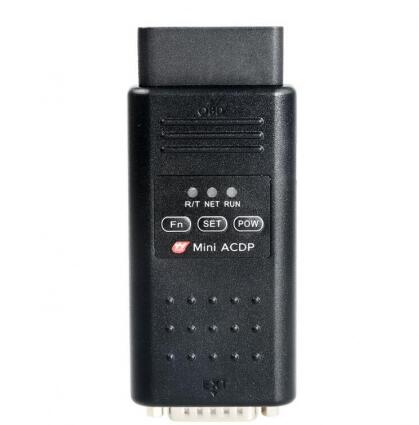
2. Yanhua Mini ACDP for BMW
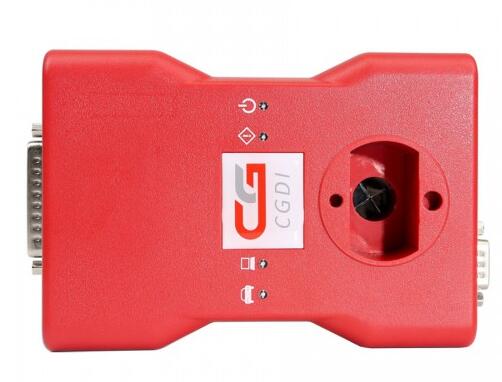
3. CGDI BMW
1. Xhorse VVDI2 BMW

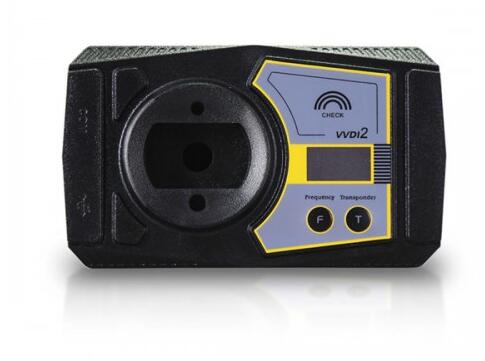
TOP 6 Reasons to get VVDI2 VVDI 2 Commander Key Programmer:
1).Comes with all VVDI functions, which is improved to be more stable
2).More vehicle supported, multi Immo functions
3).New added plug-in function and reserved connectors to include all VVDI functions
4).Newest Version: V6.6.9
5). 5 in 1 PROGRAMMER. No Need to buy other Authorization
VVDI 2=VVDI PROGRAMMER + BMW MULTI TOOL+ BMW CAS PLUS+ CAS 4 BMW+ 5th IMMO FOR VVDI
6). Software is frequently updated. You can directly download the latest update tool on official website to update your VVDI 2.
VVDI2 Commander Key Programmer QC MarkOperating system: Windows XP and Windows 7
VVDI 2 full version authorized functions includes:
-Transponder programmer
-Passthru J2534
-BMW OBD
-BMW CAS4 OBD
-Porsche IMMO data tool yes
-PSA function yes
2. Yanhua Mini ACDP for BMW


Yanhua Mini ACDP Mini BMW Tool full package supports eeprom reading, CAS1/CAS2/CAS3/CAS3+/CAS4/CAS4+/FEM/BDC key programming/odometer reset and ISN code reading without soldering.
Mini BMW Tool IMMO & Mileage Programming for all series
No need to remove chip
No need soldering
No need to cut the line
No need to lift the pin
CAS1-CAS3+ Module:
Key Programming by OBD
Read CAS EEPROM
Add Keys
Reset Mileage
Back up or recover CAS
All keys Lost
CAS4/CAS4+ Module:
Read CAS4 EEPROM without soldering/welding
Add Keys without soldering/welding
Reset Mileage without soldering/welding
Back up or recover CAS without soldering/welding
All keys Lost without soldering/welding
3. CGDI BMW


Full Version (All license for free) = BMW CAS1/CAS2/CAS3/CAS4/CAS4+/FEM/BDC IMMO+ BMW ISN Read+ BMW F Series Program+BMW F Series Coding+EGS ISN+CAS Mileage Reset+Porsche 987/911 key learning+95128/95256 Read and Write+BMW E Series Program+BMW E Series Coding+Maserati Meter Mileage Correction+BMW Data modification and verification+E-series iDrive coding+ E, F, G series diagnostic + BMW CAS4 IMMO via OBD
BMW REMOTE KEY FOB PROGRAMMING INSTRUCTION FOR BMW “RUBBER” KEY (old produced to 1999)
REMOTE CONTROL TRANSMITTER PROGRAMMING PROCEDURE FOR BMW – “RUBBER” KEY.
THESE INSTRUCTION ARE SUITABLE FOR BMW E46, E39, X3, X5 AND OTHERS PRODUCED TO 1999.
OEM PART NUMBER OF KEYS : 51218374929 / 66126955750 / 51218372844 / LX8FZV AND OTHERS.
NO TOOLS REQUIRED.
bmw_key_fob-rubber.jpg
1. GET INTO THE CAR, CLOSE ALL DOORS AND INSERT THE KEY INTO THE IGNITION SWITCH.
2. SWITCH THE IGNITION LOCK BRIEFLY TO IGNITION LOCK POSITION 1 AND SWITCH OFF AGAIN.
THE SWITCHING TIME MUST REMAIN UNDER 5 SECONDS.
3. REMOVE THE KEY FROM IGNITION SWITCH.
4. PRESS BUTTON #1 AND HOLD IN.
You must remove the key from ignition switch and press & hold button #1 within 5 seconds of removal.
5. STILL PRESSING BUTTON #1 – PRESS BUTTON #2 THREE TIMES.
6. RELASE BUTTON #1.
LED 3 will flash slowly for a maximum of 10 seconds.
When done properly the doors will automatically lock and then unlock.
7. TEST REMOTE ( S ) TO ENSURE PROPER PROGRAMMING.
If the LED does not flash or the central locking system fails to respond, you must repeat the initialization procedure.
If you possess additional transmitters for you vehicle (up to a maximum of 4 units) you must now initialize these as well.
Be sure that no more than 30 seconds is allowed to elapse between the individual initialization procedures.
Do not actuate the steering lock during this time.
https://www.obd2tool.com/blog/2020/01/28/the-best-tool-to-program-bmw-rubber-remote-key-fob/

FREE Caterpillar ET-2019C (Select Level), Diagnostic Software for Caterpillar Engines

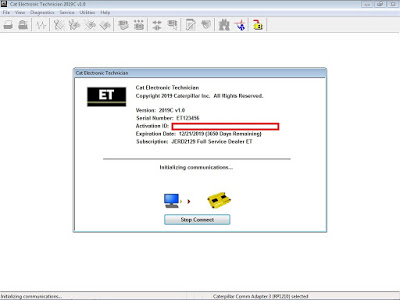
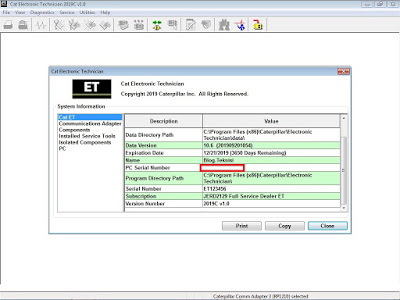
FREE Setting Caterpillar ET-2019C v1.0 (Select Level), Diagnostic Software for Caterpillar Engines (Electronic Technician), ET 2019C

Instructions:
1. Install CAT ET-2019C v1.0, download here: ET 2019C v1.0.exe
2. Run “HWID6″, click “Save to Clipboard”, download here: HWID6.exe, then send to my email here: Contact Us
3. I’ll help to create your HWID to “catet.lic” file, it’s needed to activate your CAT ET-2019C
4. Copy “FlashServer.dll”, “fnp_ld.dll”, and “catet.lic” files into C:\Program Files (or Program Files x86)\Common Files\Offboard Information Products\2019C\Flash\ download here: dll_for_FlashServer
5. Copy “Comet_libFNP.dll”, “fnp_ld.dll”, “fp.dll”, and “catet.lic” files into C:\Program Files (or Program Files x86)\Common Files\Offboard Information Products\2019C\Comet\ download here: dll_for_Comet
6. Add “set_level.reg” file into Registry, select level you want as below list; and please Contact Us
Flash Technician Full Service
Flash Technician Factory
Flash Technician Internal
NEXG5044 No Charge Cat ET
Caterpillar Product Data Transfer Utility – CPDTU
EERE3500 Military Cat ET
EERE3501 Licensed Military Cat ET
NEXG5076 Dealer Cat ET for Customer
MULT2129 Multi-Tool Full Service Dealer ET
Flash Technician Supplier
Flash Technician Flash Developer
EMDI0001 EMD Customer
CMIL3500 Cat ET for Canada Military
JERD2129 Full Service Dealer ET
JERD2142 Machines
JERD2129 Full Service Dealer ET – 2EEF2B8B
NEXG5006 Factory
JERD2141 Commercial Engines
NEXG5000 Tech School
JERD2125 On-Highway Truck ET
JERD2128 All Engines Combined (Truck and Commercial)
GT2004A
NEXG5050 Cat ET AGCO Subscription
EERE2001 Flash Factory Build
FS2004A
NEXG5009 On-Highway Truck Customer ET
NEXG5010 Ryder ET
NEXG5007 Full Service Customer ET – A7274FDE
NEXG5008 Internal
NEXG5011
NEXG5035 Premium ET
EERE2001 Comet Factory Build

https://www.obd2tool.com/blog/2020/01/25/free-caterpillar-et-2019c-select-level-diagnostic-software-for-caterpillar-engines/

2020年2月1日星期六

ICOM Next Firmware is too new to work with ISTA-P

Solutions for issue: BMW ICOM fimware is too new to work with ista-p.
I have 66.2 installed and the newest icom next firmware.
There is a window showing current Firmware 31503 and the supposed firmware 31500.
is there a workaround?
Error message:
Es befinden sich im Werkstattnetz ICOMs, die eine ungultige Firmware aufweisen.
Die autgefuhrten ICOMs sind derzeit fur eine Programmierung nicht verfugbar.
Bitte wechseln Sie in ISTA und fuhren ein ICOM Firmware Update durch.
Translated in English:
There are ICOMs in the workshop network that have invalid firmware.
The listed ICOMs are currently not available for programming.
Please switch to ISTA and carry out an ICOM firmware update.
(Solved) ICOM Next Firmware is too new to work with ISTA-P
First solution: override the firmware check
Try this:
[HKEY_LOCAL_MACHINE\SOFTWARE\WOW6432Node\BMWGroup\ISPI\Rheingold]
“Icom.Package.Version”=”00-00-00”
“Icom.Package.Version.Compatible”=”00-00-00”
“IcomNext.Package.Version”=”00-00-00”
“IcomNext.Package.Version.Compatible”=”00-00-00”
Second solution: add firmware version to license
You need to add 03-15-03.
Or use firmware fix (updated for 3.66.2.002. Disables firmware check).