Solutions for issue: BMW ICOM fimware is too new to work with ista-p.
I have 66.2 installed and the newest icom next firmware.
There is a window showing current Firmware 31503 and the supposed firmware 31500.
is there a workaround?
Error message:
Es befinden sich im Werkstattnetz ICOMs, die eine ungultige Firmware aufweisen.
Die autgefuhrten ICOMs sind derzeit fur eine Programmierung nicht verfugbar.
Bitte wechseln Sie in ISTA und fuhren ein ICOM Firmware Update durch.
Translated in English:
There are ICOMs in the workshop network that have invalid firmware.
The listed ICOMs are currently not available for programming.
Please switch to ISTA and carry out an ICOM firmware update.
(Solved) ICOM Next Firmware is too new to work with ISTA-P
First solution: override the firmware check
Try this:
[HKEY_LOCAL_MACHINE\SOFTWARE\WOW6432Node\BMWGroup\ISPI\Rheingold]
“Icom.Package.Version”=”00-00-00”
“Icom.Package.Version.Compatible”=”00-00-00”
“IcomNext.Package.Version”=”00-00-00”
“IcomNext.Package.Version.Compatible”=”00-00-00”
Second solution: add firmware version to license
You need to add 03-15-03.
Or use firmware fix (updated for 3.66.2.002. Disables firmware check).
2020年2月1日星期六

How restore Data Damaged of Toyota Steering Angle Sensor
Toyota steering angle sensor data damaged is a common problem which
usually generates trouble code:C1433.This failure is usually caused by
auto repair technician when operating battery,replacing auto
hairspring.If you ask stealership to repair it,they will advice you
replace whole module,and then do mechanical adjustment,it will cost you
several hundreds dollars.Here I share the method of How to restore Data
Damaged of Toyota Steering Angle Sensor.
Remove the Steering Angle Sensor:
Steering Angle Sensor Location and Removal

This method can apply to Toyota Diagnsotic tool which equiped with 24C02 internal data chip model and has same data structure,and no matter what Toyota Vehicle model or number.It has been verified on many car,and succeed.
Below show the steering angle data files of Toyota CROWN and Toyota Reiz.The steering sensors of Toyota CROWN and Toyota Reiz have difference appearence and difference number,but same internal data chip model:24C02 and data structure.So we can use this method to restore data file.

Toyota CROWN and Toyota Reiz data file readed by Programmer from 24C02 chip,show below:


Save data file on your laptop,and open by editor.(here we take Toyota CROWN data file as a example).Rewrite digits from 000040 line to 0000D0 line show on below picture.In the picture the digits need to be rewritten have been marked by blue underline.

After rewriting,the data file of Toyota CROWN show as below.

And then use programmer to write this data file back to 24C02 chip,and then do mechanical adjustment.
Remove the Steering Angle Sensor:
Steering Angle Sensor Location and Removal
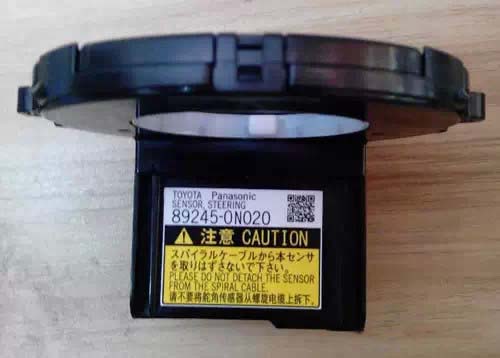
This method can apply to Toyota Diagnsotic tool which equiped with 24C02 internal data chip model and has same data structure,and no matter what Toyota Vehicle model or number.It has been verified on many car,and succeed.
Below show the steering angle data files of Toyota CROWN and Toyota Reiz.The steering sensors of Toyota CROWN and Toyota Reiz have difference appearence and difference number,but same internal data chip model:24C02 and data structure.So we can use this method to restore data file.
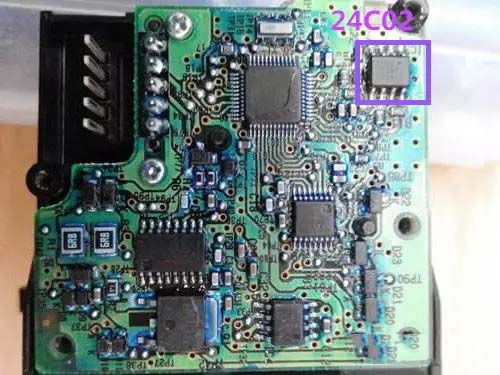
Toyota CROWN and Toyota Reiz data file readed by Programmer from 24C02 chip,show below:
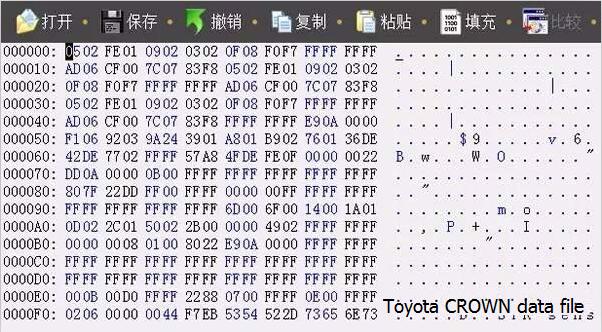
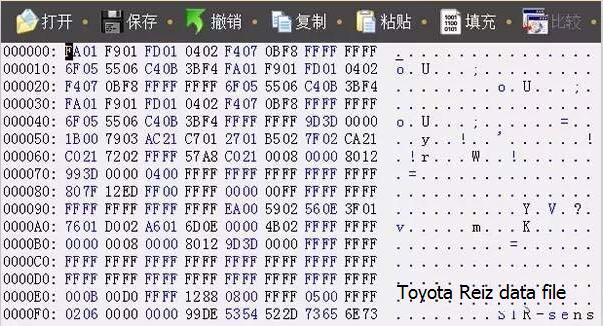
Save data file on your laptop,and open by editor.(here we take Toyota CROWN data file as a example).Rewrite digits from 000040 line to 0000D0 line show on below picture.In the picture the digits need to be rewritten have been marked by blue underline.
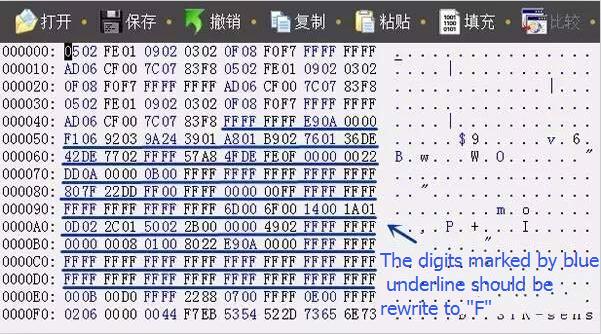
After rewriting,the data file of Toyota CROWN show as below.

And then use programmer to write this data file back to 24C02 chip,and then do mechanical adjustment.
2020年1月23日星期四
Mercedes W204 All Keys Lost by Autel IM608 + GBOX + XP400 Read Password
With last update, Mercedes Benz Software on MaxiIM IM608
did all keys lost W204 C220 CDI with EIS W207 type, succeed computing
password in 3 minutes with G-BOX 1 and key programed correctly!
Get password:
Collecting data and calculating password is in progress. Please wait. The process takes 10-50min (it takes longer for part of vehicles). Please ensure that the device and vehicle battery are stable and sufficient during the process.

Success in computing password

Autel G Box connection:
k line of the gbox to the connector of the elv and relay of the gbox to the module Sam striker fuse 27 I think I remember and the gbox connected to the port obd2 of the car comes explained the scheme of connections


3 red wire:
2 goes to fuse in front sam fuse 27 and the other wire red goes to pin KLine on ELV connector
XP400 connection:

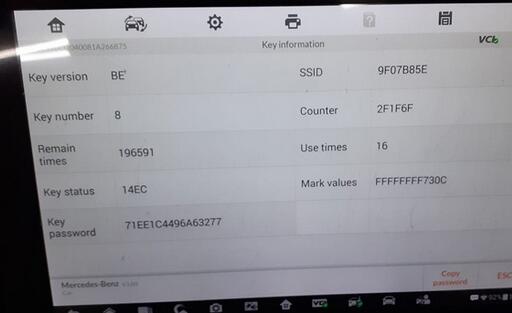
Key info:

Get password:
Collecting data and calculating password is in progress. Please wait. The process takes 10-50min (it takes longer for part of vehicles). Please ensure that the device and vehicle battery are stable and sufficient during the process.

Success in computing password

Autel G Box connection:
k line of the gbox to the connector of the elv and relay of the gbox to the module Sam striker fuse 27 I think I remember and the gbox connected to the port obd2 of the car comes explained the scheme of connections
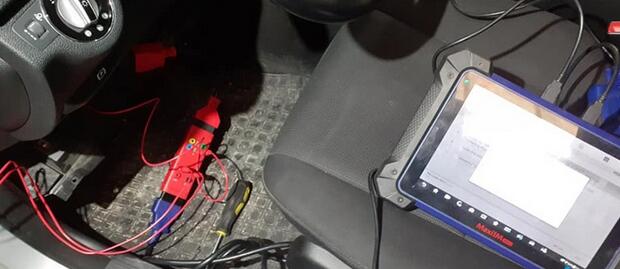
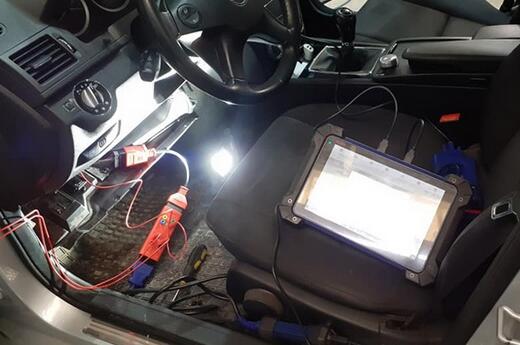
3 red wire:
2 goes to fuse in front sam fuse 27 and the other wire red goes to pin KLine on ELV connector
XP400 connection:
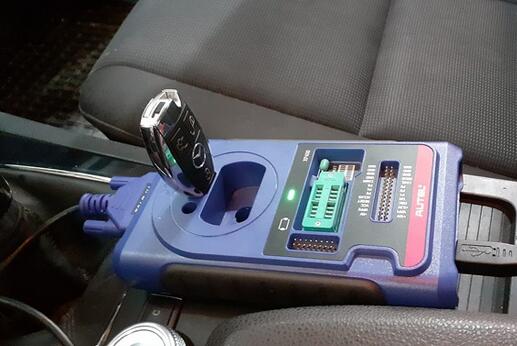
Key info:
Mercedes W204 All Keys Lost by Autel IM608 + GBOX + XP400 Read Password
With last update, Mercedes Benz Software on MaxiIM IM608
did all keys lost W204 C220 CDI with EIS W207 type, succeed computing
password in 3 minutes with G-BOX 1 and key programed correctly!
Get password:
Collecting data and calculating password is in progress. Please wait. The process takes 10-50min (it takes longer for part of vehicles). Please ensure that the device and vehicle battery are stable and sufficient during the process.
Success in computing password
Autel G Box connection:
k line of the gbox to the connector of the elv and relay of the gbox to the module Sam striker fuse 27 I think I remember and the gbox connected to the port obd2 of the car comes explained the scheme of connections
3 red wire:
2 goes to fuse in front sam fuse 27 and the other wire red goes to pin KLine on ELV connector
XP400 connection:
Key info:
Get password:
Collecting data and calculating password is in progress. Please wait. The process takes 10-50min (it takes longer for part of vehicles). Please ensure that the device and vehicle battery are stable and sufficient during the process.
Success in computing password
Autel G Box connection:
k line of the gbox to the connector of the elv and relay of the gbox to the module Sam striker fuse 27 I think I remember and the gbox connected to the port obd2 of the car comes explained the scheme of connections
3 red wire:
2 goes to fuse in front sam fuse 27 and the other wire red goes to pin KLine on ELV connector
XP400 connection:
Key info:
2020年1月5日星期日
How to Use Autel MaxiIM 608 to Detect Vehicle Remote
How to Use Autel MaxiIM IM608 to Detect Vehicle Remote
Tap Remote Detection from the menu, the function menu displays.

Put the key into suitable area and press down any key button. The screen displays the frequency of the key.

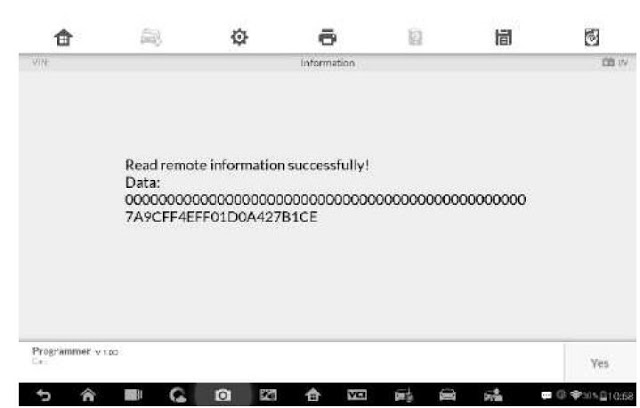
Tap Read out remote information to check the information.

Tap Remote Detection from the menu, the function menu displays.
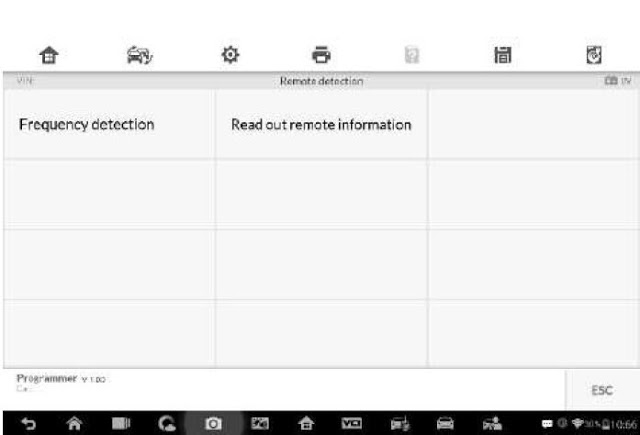
Put the key into suitable area and press down any key button. The screen displays the frequency of the key.

Tap Read out remote information to check the information.
2019年12月22日星期日
Read BMW EDC17C50 ISN Code from DDE using Autel IM608 & G Box
Managed to read 2017 BMW F-series DDE8 edc17c50 isn code in boot mode using Autel MaxiIM IM608 & g box.
Note: Autel G box is used to program Mercedes all keys lost and read BMW ISN code with IM608/IM508.
Procedure:

Remove the engine ECU module from the vehicle and open the engine ECU housing
In IM608, select IMMO->European->BMW->System Selection->Engine->Direct->Boot->F-Chassis->Bosch->TC1797 EDC17C50


(Autel IM608 will read EDC17C41, EDC17C56, EDC17CP09, EDC17CP45, EDC17CP49, MEVD17.2, MEVD17.2.4, MEVD17.2.6, MEVD 17.2.6, MEVD 17.2.8, MEVD17.2.9 etc Bosch ECUs)
System will show you operation steps.

Check wiring diagram and make good connection


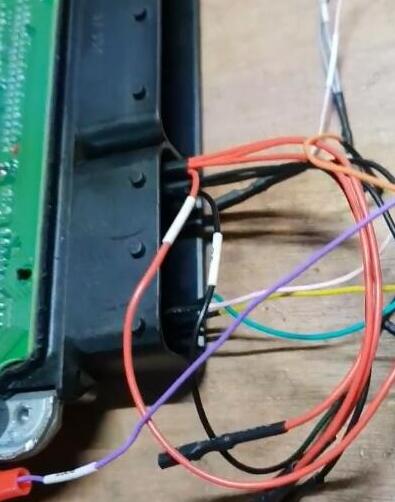
Connect the boot punctuation of the chip part and the DB15 harness boot line in the wiring diagram
Connect the engine ECU interface to the DB15 harness according to the engine ECU interface punctuation in the wiring diagram
Connect the DB15 harness to the G-BOX, then connect the P terminal of the G-Box to the J2534 ecu adapter. Connect the 12 DC terminal of the G-Box to the 12V adapter


Then select Read ISN

Reading memory data in process

Save data

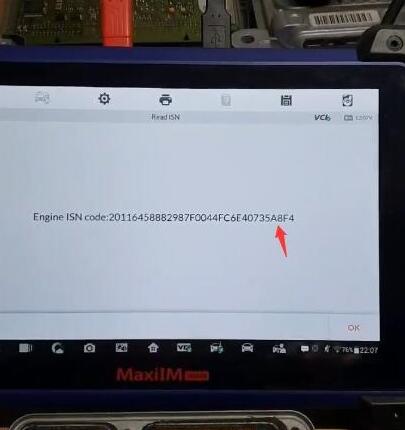
Extract engine ISN code succeed.

After completing the function, restore the engine ECU Scanner to its original state.
Done.
Note: Autel G box is used to program Mercedes all keys lost and read BMW ISN code with IM608/IM508.
Procedure:
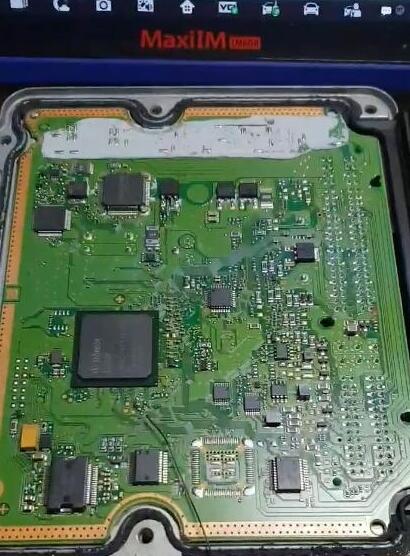
Remove the engine ECU module from the vehicle and open the engine ECU housing
In IM608, select IMMO->European->BMW->System Selection->Engine->Direct->Boot->F-Chassis->Bosch->TC1797 EDC17C50
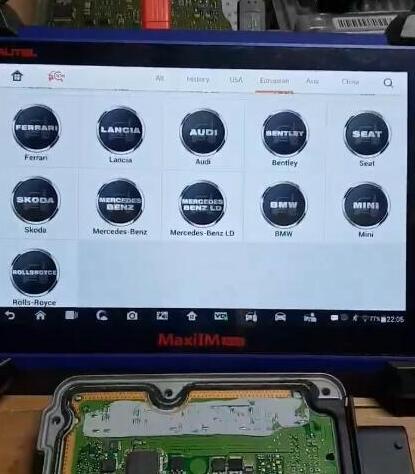
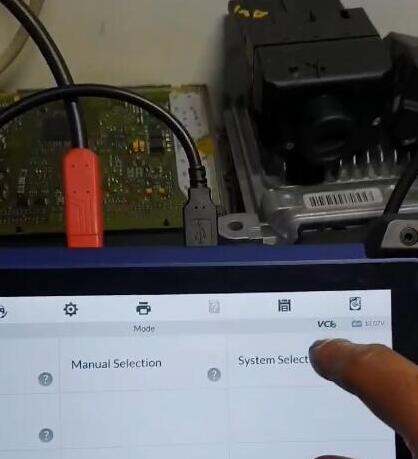
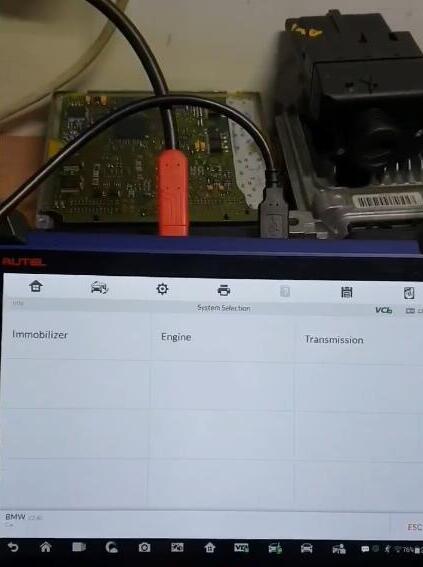
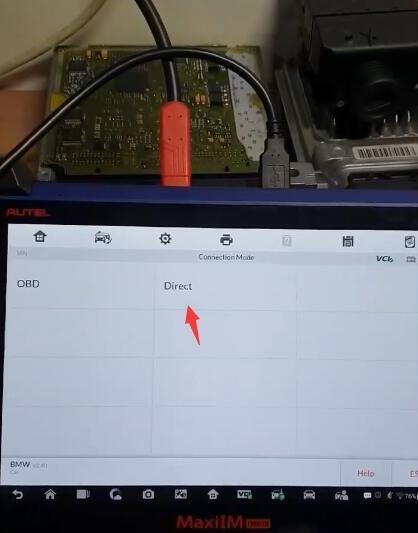
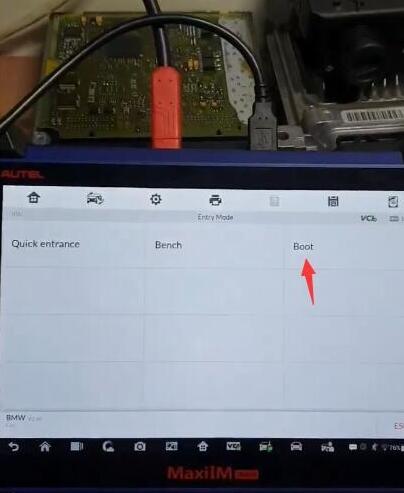
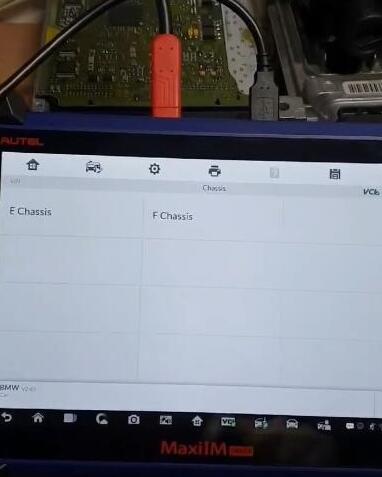
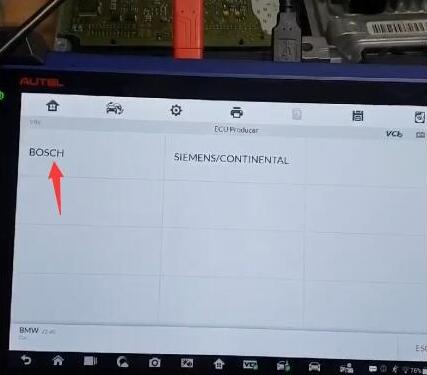
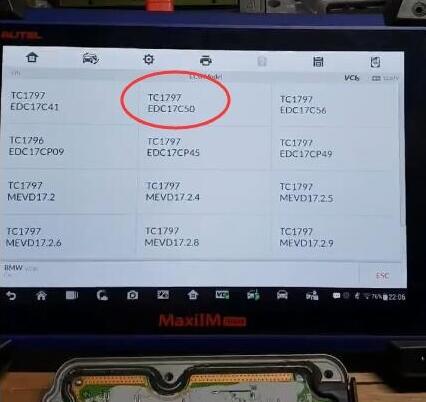
(Autel IM608 will read EDC17C41, EDC17C56, EDC17CP09, EDC17CP45, EDC17CP49, MEVD17.2, MEVD17.2.4, MEVD17.2.6, MEVD 17.2.6, MEVD 17.2.8, MEVD17.2.9 etc Bosch ECUs)
System will show you operation steps.
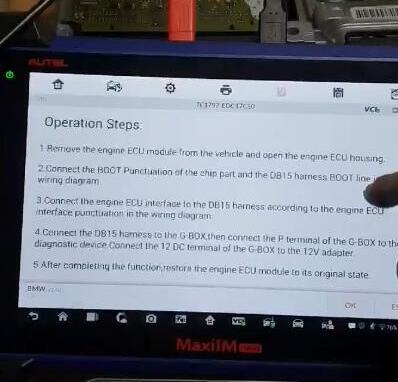
Check wiring diagram and make good connection

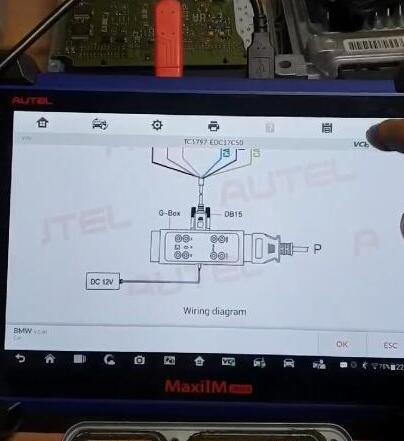
Connect the boot punctuation of the chip part and the DB15 harness boot line in the wiring diagram
Connect the engine ECU interface to the DB15 harness according to the engine ECU interface punctuation in the wiring diagram
Connect the DB15 harness to the G-BOX, then connect the P terminal of the G-Box to the J2534 ecu adapter. Connect the 12 DC terminal of the G-Box to the 12V adapter
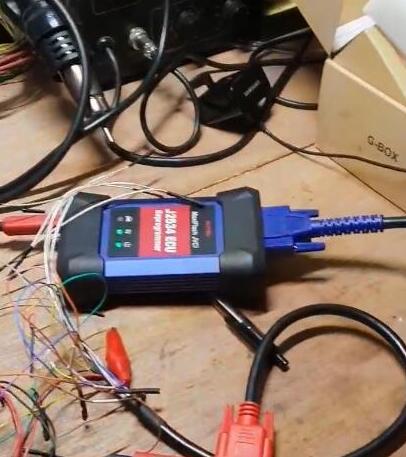
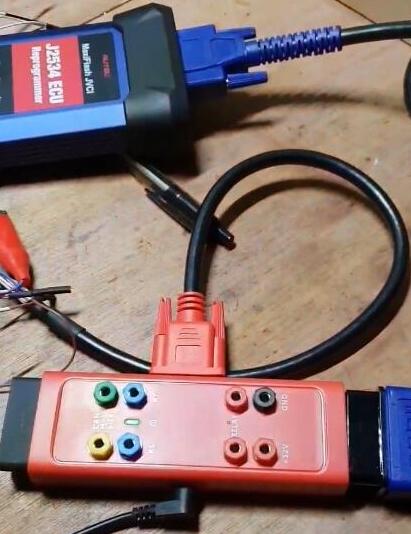
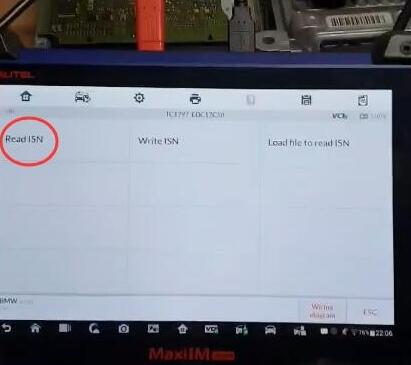
Then select Read ISN
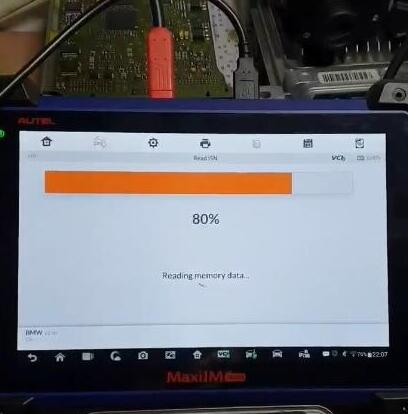
Reading memory data in process
Save data
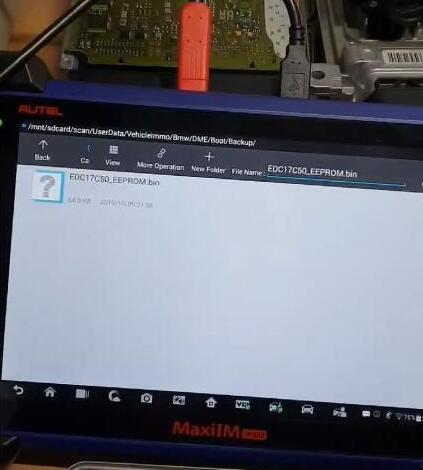
Extract engine ISN code succeed.
After completing the function, restore the engine ECU Scanner to its original state.
Done.
2019年12月4日星期三
How to perform the DOIP setting of the MB SD C4 PLUS
This post will show you how to perform the DOIP settings of MB SD C4 Plus Diagnostic tool.
Here are the steps:
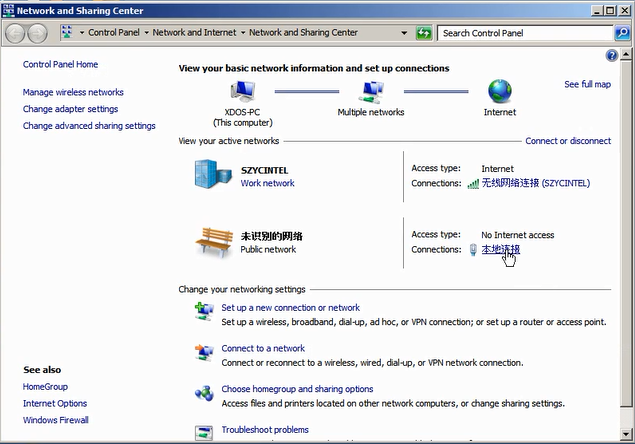
1. Open Network and Sharing Center, click local connections

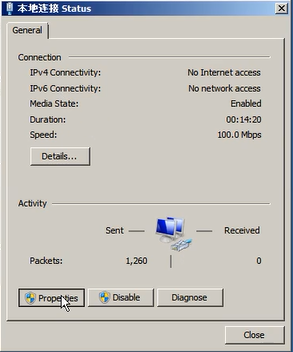
2. Choose ” Properties”

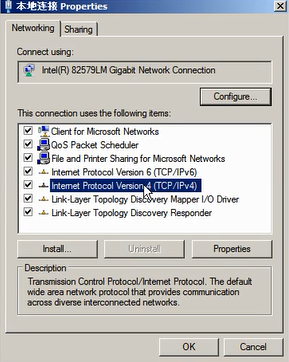
3. Select “Internet Protocol Version 4(TCP/IPv4) Properties”

4. Set the diagnostic IP address

5. Click “Advanced” to continue

6. Click “Add” to set the IP address for DOIP.

7. Set the IP to 169.254.0.*

8. Click “Add” and click “OK” to complete the setting.
Here are the steps:
1. Open Network and Sharing Center, click local connections
2. Choose ” Properties”
3. Select “Internet Protocol Version 4(TCP/IPv4) Properties”
4. Set the diagnostic IP address
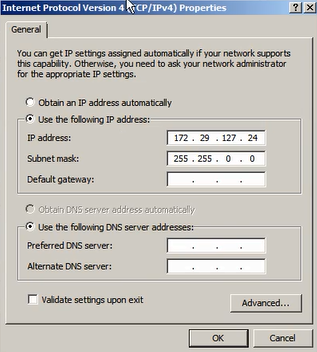
5. Click “Advanced” to continue

6. Click “Add” to set the IP address for DOIP.

7. Set the IP to 169.254.0.*
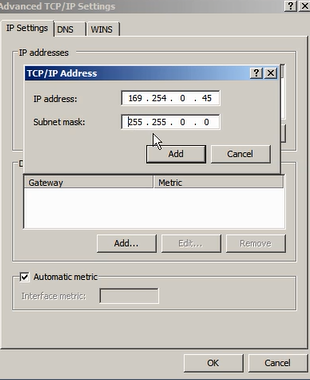
8. Click “Add” and click “OK” to complete the setting.
订阅:
博文 (Atom)