显示标签为“New SDconnect C4”的博文。显示所有博文

2019年12月4日星期三

How to perform the DOIP setting of the MB SD C4 PLUS

This post will show you how to perform the DOIP settings of MB SD C4 Plus Diagnostic tool.
Here are the steps:
1. Open Network and Sharing Center, click local connections
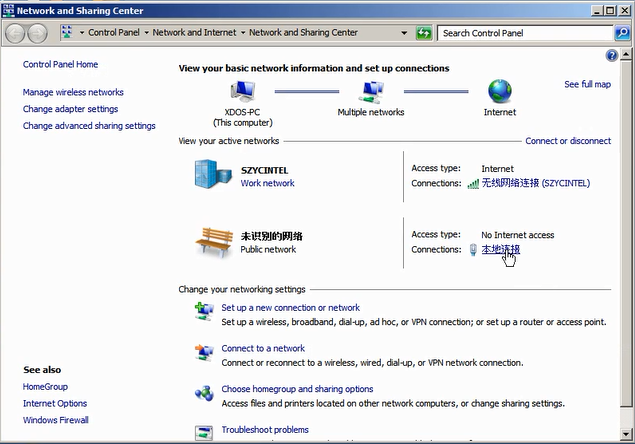
how-to-perform-the-doip-setting-of -mb-sd-c4-plus-01
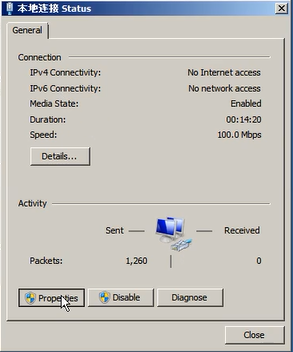
2. Choose ” Properties”
how-to-perform-the-doip-setting-of -mb-sd-c4-plus-02
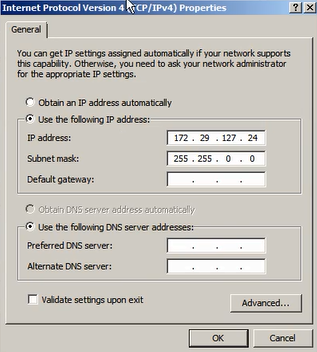
3. Select “Internet Protocol Version 4(TCP/IPv4) Properties”
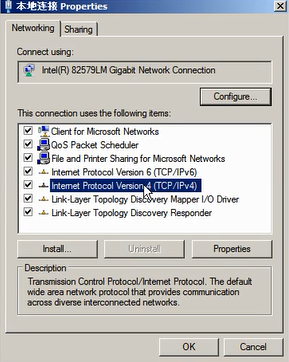
how-to-perform-the-doip-setting-of -mb-sd-c4-plus-03
4. Set the diagnostic IP address
how-to-perform-the-doip-setting-of -mb-sd-c4-plus-04
5. Click “Advanced” to continue
how-to-perform-the-doip-setting-of -mb-sd-c4-plus-05
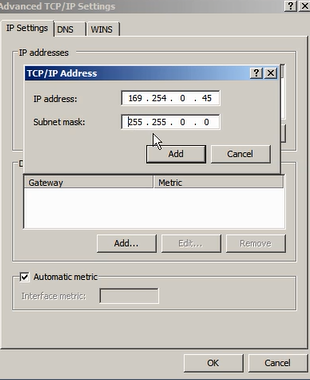
6. Click “Add” to set the IP address for DOIP.
how-to-perform-the-doip-setting-of -mb-sd-c4-plus-06
7. Set the IP to 169.254.0.*
how-to-perform-the-doip-setting-of -mb-sd-c4-plus-07
8. Click “Add” and click “OK” to complete the setting.