2019年8月20日星期二

LONSDOR K518S Auto Key Programmer same as Lonsdor K518ISE Key Programmer and car list


Lonsdor K518S  Key Programmer:
1.Support language: English
2.Update: One key update online ;  No Need Token for all cars
3.Support  Immobilization Key Programming, dometer adjustment
4.Built-in-in Volkswagen 4th & 5th adapter
5.Built-in Chip & remote detection module.
6.Support car list : http://en.lonsdor.com/html/function
7.Free BMW FEM key programming
8.K518S key programmer is the latest version of Lonsdor, with wider vehicle coverage in key programming, it is customized as the first masterpiece to the overseas market from Lonsdor.

With months of preparation and rigorous testing, from the software design to the user experience, it is an epitomize of Lonsdor years of industry experience.

Highlight:
1.Lonsdor K518S is a key programmer for all makes from Europe, America, Asia and China.
2.It can also support odometer adjustment for some makes.
3.Its nice features are built-in Volkswagen 4th 5th adapter & RFID transponder reader / writer
4.Program Toyota/Lexus smart key all key lost via OBD
5.Free BMW FEM key programming (for all keys lost, enter 32-bit ISN code).
6.Lonsdor K518S is specialized on Volvo, Maserati, Ferrari, Lamborghini, Bentley, Nissan etc.support Astra H programming

K518 S key programmer Function Description:
Please pay attention to below function description before using the device.
1.Immobilization: immobilizer system diagnosis
2.Odometer adjustment: mileage diagnosis and correction
3.Hardware testing: test if the hardware can function well
4.Adapter: after dismantling, diagnose certain car models
5.Setting: set up basic device information
6.Update firmware: adapter firmware upgrade & update (connect KPROG adapter
7.with OBD test cable and connect K518S with 12V power supply)
8.One key upgrade: click to update to the latest system data
9.Shutdown – turn off the device

Cars coverage list for immobilization:
Europe:Audi, BMW, Benz, VW, Volvo, Citroen, Ferrari, Maserati, Fiat, Lamborghini, Jaguar, MG,
Land Rover, Bentley, Lancia, Opel, Peugeot, Porsche, DS, Renault, Alfa Romeo, Smart,
Borgward
America:Cadillac, Chevrolet, Dodge, GMC, Buick, Hummer, Ford, JEEP, Lincoln, Mercury
Asia:Honda, Hyundai, Isuzu, KIA, Lexus, Mazda, Mitsubishi, Nissan, Ssangyong, Subaru, Suzuki,
Toyota, Shigaoka Queen
China:Iveco, Trumpchi, BYD, Geely, Chery, Great Wall, Young Lotus (Basically all Chinese car
models are included)

Odometer Adjustment Car List:
VW, Porsche, Ford, Jaguar, Land Rover, Mazda, Audi, Renault, Hummer, Hyundai, Kia…
Note: more high-end cars will be updated very soon.

Note: K518S is still under rapid upgrading, more functions and be released soon, please refer to our website www.lonsdor.com foalso you can “One key update” for the latest version by yourse

If you like Lonsdor K518ISE better,you can click tthe link to get more information:
https://www.obd2tool.com/goods-6954-Lonsdor+K518ISE+Key+Programmer.html

2019年8月2日星期五

2019A Cat Caterpillar ET Cat ET 3 Software Cat Diagnosis Software

Cat Caterpillar ET Feather:
  1. Latest Caterpillar ET Software to work with CAT/CAT3 Truck Scanner
  2. With KeyGen Active and Install Video
  3. Support Multi-languages:English, Chinese, Danish, French, German, Italian, Japanese, Portuguese, Russian, Spanish

Cat et Caterpillar Electronic Technician Software 2019A V1.0:
Type of catalogue: Caterpillar Electronic Technician Diagnostic Software
Make: Caterpillar
Region: WorldWide all region
Operating System: Windows 7 32 bit, Wnidows 7 64 bit, Windows 8/8.1 32 bit, Windows 8/8.1 64 bit, Windows 10 32 bit, Windows 10 64 bit

2019A Cat et Diagnostic Software PC Requirements:
Recommended Configurations:
PC containing a 2.0 GHz dual-core processor
3GB RAM
3GB of available hard disk drive
DVD-ROM drive
15.4 inch XGA Screen (1280×1024 compatible)
Microsoft Windows™ 7 Professional or Windows 8 Professional, Windows 10 Professional (Not tested with Home Edition) (Note: Windows 8 RT is not supported)
RS232 port with 16550AF UART or compatible (for use with Comm Adapter II)
USB 1.1 or 2.0 port (for use with Comm Adapter 3)
Ethernet RJ45 connector
Built in pointing device or mouse
For security purposes, Microsoft Internet Explorer version 9 or newer is recommended.

Caterpillar ET Software 2019 Function:
This diagnostic app allows you to:
View active and logged diagnostics.
View events where irregularities occurred and were logged by the ECM.
View the status of a group of parameters (temperatures, pressures, etc.) simultaneously.
Record and log performance data.
Graph a group of status parameters.
View the current configuration of an ECM.
Change ECM configurations.
Perform diagnostic tests.
Perform calibrations.
Print reports and diagnostic results.

Please keep in mind that some ecm settings for example, speed limit requires factory password. The factory password generator is not included in this application.

Software display:
4
3
2
1

Feedback from GM Tech2 with CANdi TIS Works for GM/SAAB/OPEL/SUZUKI/ISUZU/Holden

I’ve got one and it works perfect on my 08

A few of us have them….. works great! Can also get to things like the rear air ride (if yours has that) which no other tool can deal with.

That being said I’ve seen on other forums where some people have major issues with their clones. Best I can say is I got my GM Tech2 from obd2tool and it works perfect.

It will come in handy sometimes. Now figuring out how to use all of the functionality will take a bit too. You can pretty much get right into diagnostics and whatnot pretty easy though. Programming takes a bit more as you will need to either install TIS2000 or pay for a short subscription to the ACDelco TIS system. TIS2000 is a pretty old program but does still have updates and whatnot for some things in our H2’s. The tricky bit is it runs on Windows XP. There is tons of info online about ways of getting that software installed and working though. The Tech2 will also come in handy for other GM vehicles as well and can give you a lot more info that most any other scan tool.

I’m pretty sure this one…. That is the same one I got a couple of years ago.

GM Tech 2 Feather:
1. Multi-langauge:English, Italian, French, Portuguese, German, Spainish, Korean, Japanese, Thai, Chinese
2. Update: via 32MB Software Card, when there is newer version, you can just buy new card to update
3. Year Coverage of Diagnosis:From 1992 to 2013, With Help of Tis2000 Software, It Can Do Programming for Cars Before Year 2007
4. Our GM TECH2 comes with with TIS2000 Software(CD)

Tech2 for GM Software Version:
GM           English 33.004  (Support Cars from 1991-2014)
SAAB       English 148
OPEL      English 180 (Support Cars from 1997-2014)
Holden    English 149 (Support Cars from 1999-2013) (For North American Area Only)
English  147.000  (Support Cars from 1999-2012 )(For Australia)
SUZUKI  English 01.210.020
ISUZU     English  CAN-BUS V180 (CAN-BUS support car models after 2010)
K-Line  11.680    1996-2014 (K-line support car models from 1996 to 2014)

2019年8月1日星期四

FAQ for VXDIAG VCX Porsche Tester Piwis III with Lenovo T440P Laptop

PIWIS III is the third generation of Porsche diagnostic tool which will definitely grow your business to the new highest level of services. This masterpiece is created by Porsche engineers, provides to its user a plenty of possibilities for providing high qualified diagnostics and repairing services for the newest produced models of Porsche cars all over the world.

1.Q: Does VXDIAG Porsche PIWIS3 support French?.
A: Yes. You can configure language by yourself..

2.Q: Can I use my personal computer?.
A: No, the computer and the device is bound together. Because The Piwis III is bound with the encrypted chip. If you unplug the hard disk and insert into the other computer, then the software will has no nonsense..

3.Q: Can i add Porsche piwis3 authorization to the vxdiag full device?.
A: Yes, only to VXDIAG FULL multi device. But need to purchase laptop additionally to use with PIWIS3. But if you buy Auto Scanner Tools VXDIAG Porsche PIWIS3 hardware, you are able to add other car brand license..

4.Q: Can i add Mercedes and BMW and Land Rover license to VXDIAG Porsche PIWIS3 hardware?.
A: Yes. it can..

5.Q: What’s the difference between VXDIAG PIWIS2 and PIWIS3?.
A: PIWIS3 has all functions of PIWIS2. PIWIS3 supports newer Porsche model with DoIP protocol, PIWIS2 does not..

6.Q: Is it online access possible for VXDIAG Porsche?.
A: Yes, but you need online access account. We don’t provide the account..

7.Q:Will porsche piwis 3 access 2018 GT3 RS and 2016 GT3 RS?.
A: Yes. it will..

8.Q: Will Piwis III renew ECU. Can i pay you for online programming service?.
A: PIWIS3 will renew ECU on Porsche. We don’t provide online programming service..

9.Q: Will PIWIS3 do new ECU programming or initialization? It is a Porsche 911 GT3 2015..
A: Yes. It will..

VXDIAG Porsche Piwis III Functions & Features:
1.New operation system and more intuitive diagnostic interface
2.New VCI for post-2018 vehicles with DoIP diagnosis
3.Good at maintenance, repair, control units change and programming & setting codes
4.To login for online immobilizer programming
5.To find out leading faults
6.To look for maintenance wiring diagram
7.To support special functions like modification or flashing, with Engineering mode (Development version)

VXDIAG VCX-DoIP Porsche Piwis 3 Functions List:
1.Diagnostics application is used for communication with control units. You can search for, identify, code and control program units, read out the event memory, execute complex processes, change drive links and execute routines.
2.Guided fault finding (GFF) generates a test plan for a fault code. This test plan shows the best sequence for carrying out tests. GFF compiles a list of recommended tests, documents and wiring diagrams
3.Actual values/input signals functions displays you the actual values and input signals of control units
4.Drive links/tests function displays the drive links of control units, allows you to change the parameters of these drive links and run test routines for individual control units
5.Maintenance/repairs function group – use this function to call up control unit-specific processes that cannot be implemented generically from the ODX data
6.Coding/programming function group – use this function to write coding values. Values can be coded automatically or set manually. This function group includes (Automatic coding, Manual coding, Customer-specific settings and Factory settings) coding modes
7.Logging – use this function to activate logging for diagnostics, guided fault finding (GFF) and measuring equipment applications. Temporary and permanent working log can be created
8.Filter – use this function to limit the view of the control units installed in the vehicle. In the diagnostic application you can create, edit, activate, deactivate or assign filters
9.Wiring diagrams application is the representation of physical connections and layouts of circuits

2019年7月23日星期二

Farmers Thrown Under Bus By Own Lobbying Group in ‘Right to Repair’ Fight


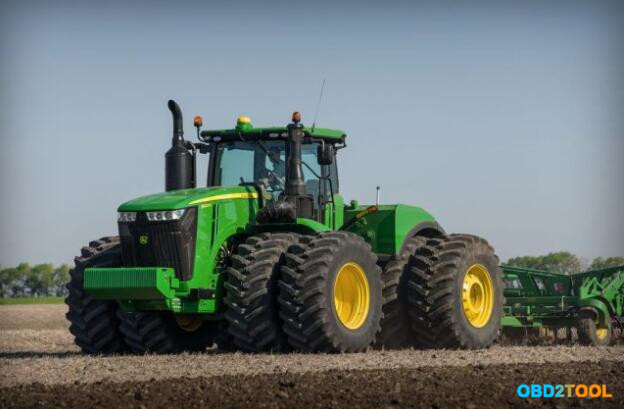
John-Deere-tractor-1
Farmers in California have lost the fight to be allowed to repair their own tractors and equipment thanks to the capitulation of their own lobbying group. This issue has been gathering steam for the last few years, after aggressive moves by John Deere Service Advisor to lock down the equipment. As our Ryan Whitwam wrote last year:
John Deere’s tractor firmware prevents the owners from making an unauthorized repairs. Whenever maintenance is needed, an authorized agent needs to swing by and connect to the tractor with diagnostic software. They okay the repair, and the tractor then works. Without that, it’s a very big paperweight. John Deere charges several hundred dollars for service calls, plus $150 per hour for the technician. When techs aren’t available, they have to wait. The alternative many are starting to turn to is pirating the diagnostic software themselves.
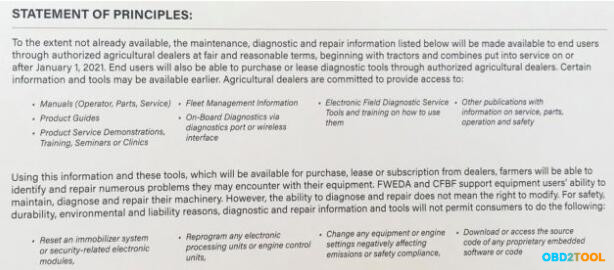
Here’s where things are in the present day: Back in February, the Equipment Dealer’s Association promised to make a few concessions to farmers, promising that repair manuals, product guides, diagnostic service tools, and onboard diagnostics would all be available to farmers by 2021. But the agreement only covers equipment sold on or after January 1, 2021. It says nothing about explicitly making these tools available for older tractors. It also allows tractor manufacturers to continue using software lockouts in ways that could prevent repair. All of this is what the EDA promised voluntarily, with no negotiation. The California Farm Bureau Federation was ostensibly supposed to push for a better deal, including continuing to fight for so-called “Right to repair” legislation in the state legislature. Instead, the organization has signed an agreement with the EDA that codifies the voluntary February offer… and that’s it.
John-Deere-tractor-2
The only difference between what the EDA offered and what the CFBF agreed to, according to Vice, were some minor adjustments to the statement of principles that were too minor to actually be noted or described. The final document was written entirely by manufacturers, for manufacturers and, as Vice notes, “it enshrines what the Farm Bureau of California now believes farmers are not supposed to do with their tractors, which includes modifying the embedded software.”
Farmers are effectively out of the right to repair fight in California and have literally nothing to show for it that they weren’t getting from the EDA already. The final agreement doesn’t address the fact that Heavy Duty Scanner John Deere monopolizes tractor repair. It makes no provision for the sale of spare parts. It states that repair and diagnostic resources will only be available for tractors that haven’t even been built yet, offering no improvements to farmers today. It does not mention anything about fair and reasonable prices for parts, only fair and reasonable prices for maintenance and diagnostic information. There’s also no mention of how patches, updates, or firmware will be distributed to farmers.
These are precisely the sorts of points that a group like the CFBF might be expected to negotiate on. At the very least, they’re issues that tie into the larger question of how much control manufacturers should be able to exert over a product once it leaves the factory floor. Farmers might be interested in those questions but their representatives apparently weren’t.

2019年6月29日星期六

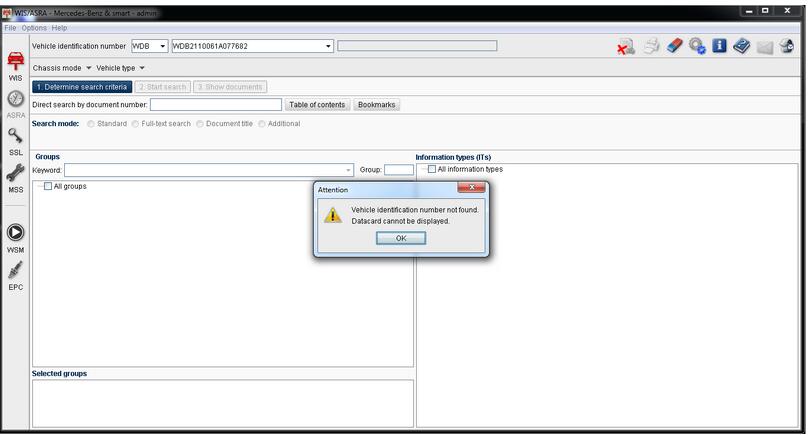
SD Connect C4 WIS VIN not found, datacard not display

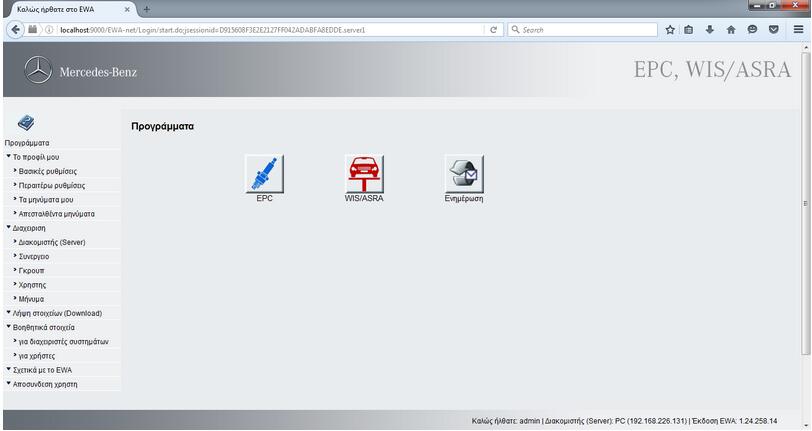
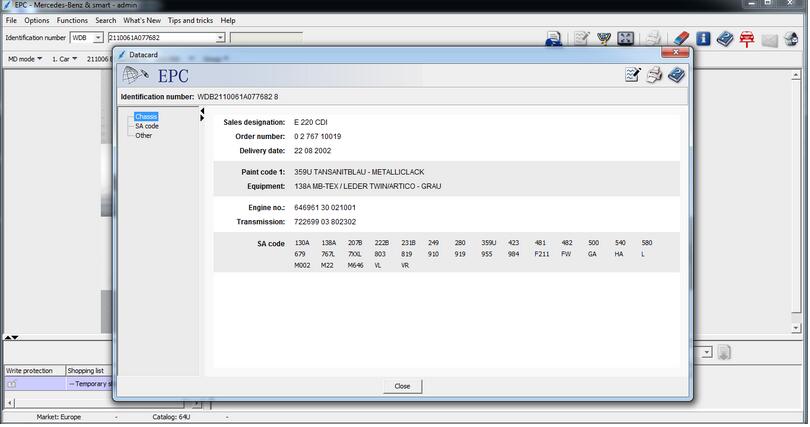
I have installed EPC 02/2016 and WIS 04/2016 in ewa-net.. But, got into some troubles with WIS datacard option that is grey. Luckily, I managed to solve it. Here is all my experience with MB SD Connect Compact 4 WIS & EPC.
epc_wisbmw-epc-software-1 epc_wisbmw-epc-software-2
EPC works fine but in WIS when it give VIN, i have this error message:
vehicle identification number not found.
datacard cannot be displayed.
epc_wisbmw-epc-software-3
I opened with my Notepad the wis_cfg.xml file from the EWA-NET Folder\Config &
searched the word: “datacardurl” replaces the lan ip address with “localhost” in the
2x points that i watched:
<PARAMETER name=”gateway”>EWA-net/ewa-net</PARAMETER>
<PARAMETER name=”datacardUrl”>http://PC.localdomain:9000/EPC-net/datacardapi</PARAMETER>
<!– URL of datacard service for Snap On’s datacard view: –>
<PARAMETER name=”datacard_V2_Url”>http://PC.localdomain:9000/EPC-net/dcapi</PARAMETER>
and i changed it to:
<PARAMETER name=”gateway”>EWA-net/ewa-net</PARAMETER>
<PARAMETER name=”datacardUrl”>localhost:9000/EPC-net/datacardapi</PARAMETER>
<!– URL of datacard service for Snap On’s datacard view: –>
<PARAMETER name=”datacard_V2_Url”>localhost:9000/EPC-net/dcapi</PARAMETER>
The wrong part is http://.
I remove it
Save the .xml file and Reboot the PC!
All works fine now!!!!
I think I should buy items from a more professional seller like obd2tool.com. My brother got MB SD connect C4 there and never got into troubles like me. His WIS and EPC with SDconnect also works good also.

2019年6月23日星期日

OEM witech Micropod2 Clone Review on Dodge DS and WK

Here is all my ideas of wiTech MicroPod 2 Clone before and after purchase. Have posted in dodge-dart forum.
Now, i’d like to do collected and share with more fellows. Hope it’s helpful
Before purchase:
Though I haven’t tried it personally the flash files can be downloaded with a techauthority subscription. I believe car manufacturers are required by law to make them downloadable.
Emissions related controllers can be flashed with J2534 programmer
Supposedly all flashes can be done with a witech micropod clone (and the oem witech micropod obviously)
I’ve looked at a lot of the aftermarket tools and they are all far more expensive than the clone and probably don’t have the same Chrysler coverage as the witech micropod.
Link to purchase:
I just ordered one… used from obd2tool.com
Will let everyone know how it works out.
Shipping:
Will let everyone know in a few days – just got a shipment notification.
Cars to test:
I have a 2015 WK 3.6L (wife) and a 2015 DS 5.7L (me).
I’ll let you know how it works on the 2015 model years. I looked at autoenginuity but it got mixed reviews and looking at the screenshots on their website, the UI seemed weird.
Plus, with the Chrysler add-ons, it is twice the price of the witech clone. I’ll be happy if I just get full Chrysler OBD 2 sensor monitoring plus a few misc tests. I can handle paying the dealer for flashes if I must
Package received:
Ok, so here’s an update… the kit shipped directly from China and arrived in a few days. The Micropod clone itself appears to be reasonably high quality but there are obvious differences from the OEM version: no lanyard, no wi-fi, no metal clip on the OBD 2 connector, etc. The firmware that mine came with was v2.4.1.
clone-micropod-2-witech-review
wiTECH software:
I followed the directions that came with the kit (albeit in somewhat fractured English) and upon starting the wiTECH software, I got a “device with serial number XXX-XXXXX is not registered” error message.
The company that sold it to me said the copy of wiTECH was destroyed somehow and that I needed to buy a “wiTECH hdd” from them for a small additional fee. Not entirely sure what that would be but I worked around the problem before I got their reply. Long story short, I am a computer guy so I spent a couple of hours messing around with the software and the computer it was installed on and was able to get around the issue.
Did on cars 2015 DS & WK:
I connected it to my 2015 DS and my wife’s 2015 WK with no issues. I disabled the side view mirrortilt in reverse on her WK (only thing she didn’t like about it) and she was thrilled. There are functions to bleed ABS, program tire sizes, etc. There are literally hundreds of sensor readings, dozens of tests, actuators and misc functions that you can perform that seem to be very vehicle specific – which you would expect. Every switch/gadget in the vehicle seems to have a corresponding sensor reading of some kind in the software. The only odd behavior I saw was when I connected to the ABS computer of my DS… the EVIC freaked out and started screaming to service the ABS. Maybe that is a safety feature of some kind so folks don’t go driving while messing with the ABS computer? Powering the vehicle off and on again made the ABS warning go away. I could not find any “PROXI alignment” functions – maybe they don’t apply to my vehicles?
I did not try flashing anything as I don’t have a good enough reason to sign up for a time-limited TechAuthority subscription at the moment but next time I do, I’ll give it a shot. At the very least, it will be nice to be able to go to the dealer next time and tell THEM which modules need updating (wiTECH lets you print an ECU report) because whatever point-of-sale software the advisors use doesn’t always tell them when an update is available. For example, my PCM is on an AE revision but TechAuthority said that AF is available (and has been since before my last dealer visit)
Summary:
This was $169 well spent in my eyes.
On a side note:
I’ve done a considerable amount of research on this software and it appears that as of the 17.04.27 P4 patch level, the wiTECH 1.0 system has been EOL’ed for all CAN bus vehicles – forcing you to use the 100% web-based wiTECH 2.0.
If you decide to move forward with the Micropod clone, you will need to block the P4 update (or find a way to block the “diagnostic.js” file that does the check) or the software will kick you out seconds after opening the vehicle topography.
Once the update is blocked, it works fine – confirmed up to the 2015 MY.