2018年8月18日星期六

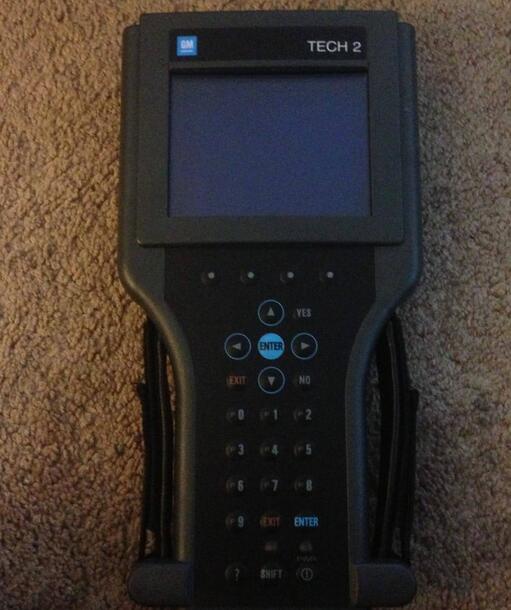
How do you think of Tech 2 made in china

Please advise: what do you think of Tech 2 made in china:
17-1
I bought my Tech2 from obd2tool.com and it works great. Cannot really compare software with a Tech2 as that is comparing hardware to a program. That being said, there is a software side of things that work alongside the Tech2 which is the TIS2000 software. Getting that working is a bit of a project in and of itself as the software is old and seems to work best on Windows XP. The TIS2000 software is really not needed to use the Tech2 though – that is needed if you want to update the firmware in the various modules in your vehicle like the ECU, BCM, DDM, etc.
Simply put though. There is no other tool that can do everything on your H2 that the Tech 2 can do. It is the only tool with things that are very specific like calibrating the rear air suspension module. Other tools can be very powerful but that are mostly just have features that are common to many vehicles and will not have things that are specific to just one or two vehicles.
I cannot speak for any on OBD2TOOL. I’ve seen both good and bad reviews on the ones from there. Also the link you gave just takes me to the Aliexpress home page. Regardless it would not matter as again, I have no way of knowing if one from some seller on there will be a good one or not.
It is also worth spending the extra to get the case which does cost a good bit more. These come with a lot of different adapters and parts and the case makes it very nice and easy to keep it all together.
This is the kit that I ordered. It also includes the Professional Diagnostic Tool Candi module which is needed for many newer model GM vehicles.

http://forobd2tool.com/blog/2018/08/07/how-do-you-think-of-tech-2-made-in-china/

Does icarscan can be used to lower a 957 as can be done with a Durametric

2-1
Does Launch ICARSCAN have the capability to calibrate the height sensors for the air suspension on a 958?  So.. I’d think yes, but I haven’t done it. All you’re doing when you do it this way is lying to the aiir-suspension computer – telling it the car is higher than it is. I know I can read the current calibration, and there is some function to write new calibrations to the computer. That’s the same thing you do with Durametric.
That said I don’t have a 957 to make sure the same capabilities are available, but in general – if it can be done with a Dorametric Pro – it appears so far – this can do everything the Pro does.
As far as I can tell – the updates end after a year. That mostly effects people who may buy a newer car than their software currently covers. So far mine hasn’t told me the software “expired”..
For a DIY owner – it’s very valuable since you can read error codes/faults/data from OBD2TOOL ALL the computer modules in the vehicle. Your ’08 probably has 10-12 computers in it.. (a 958 has more than 20..) It can be quite useful if you want other people to help troubleshoot a problem if you can give them a Porsche specific stored error code. MANY of the modules do not report problems via OBD-II codes – the stored errors reports can only be accessed with a tool that can read their memory, and to do this it must mimic the Porsche PWIS diagnostics tool the dealer uses ($15k/rental/year.)
So – your choice. If all you want to do is reset service reminders there are cheaper ways to do it. If you want to know what’s going on and what the car thinks is going on (more important IMHO) – you need something like this Launch X431 or a Durametric.
http://crp129.com/2018/08/06/does-icarscan-can-be-used-to-lower-a-957-as-can-be-done-with-a-durametric/

2018年8月10日星期五

Program Mercedes W212 All Keys Lost with CGDI Prog MB

How to copy Mercedes W212 key without key (all keys lost) with CGDI Prog MB Key Programmer.
9-1
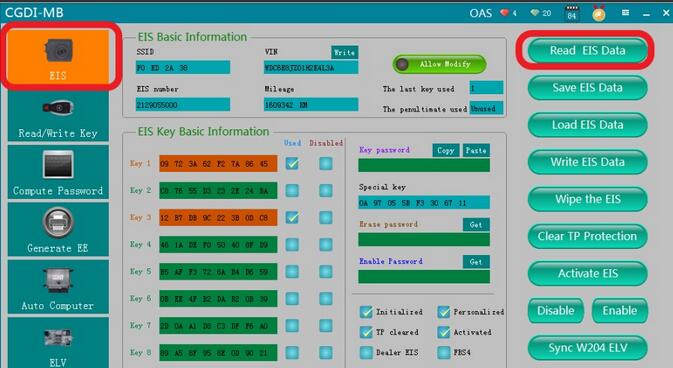
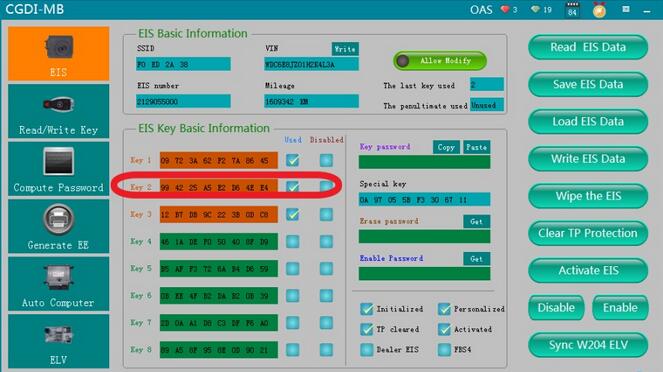
Go to EIS interface, read related information
9-2
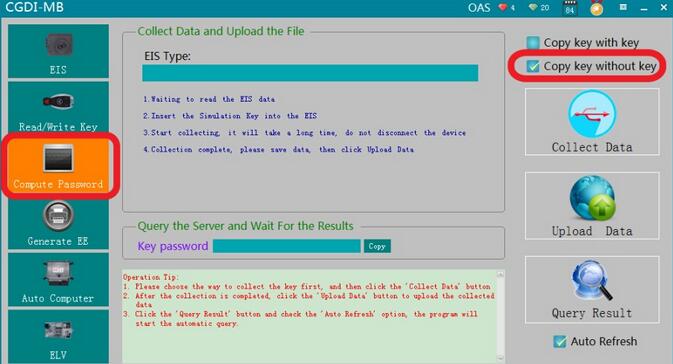
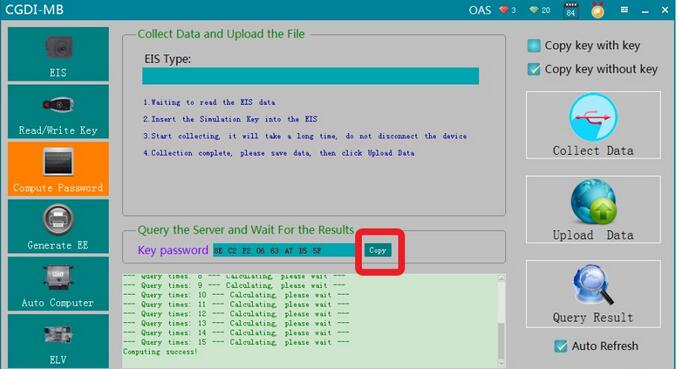
Turn to “compute password”,choose“copy key without key”
9-3
Click“collect data”
9-4
please insert the simulation into the EIS in 30 seconds
9-5
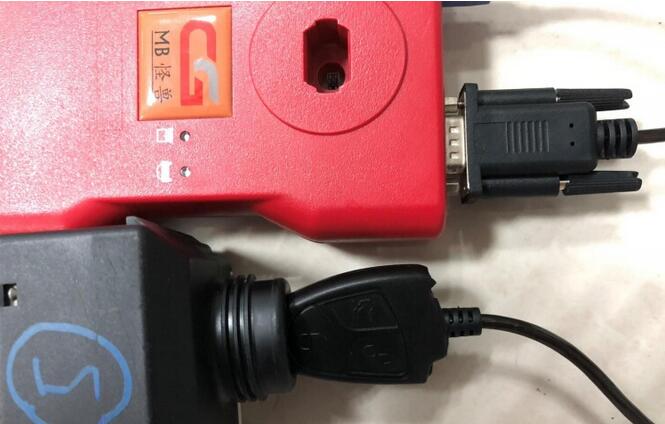
Physical operation
9-6
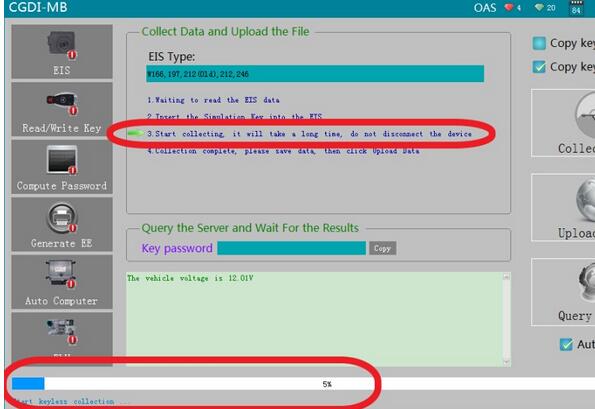
It is collecting..
9-7
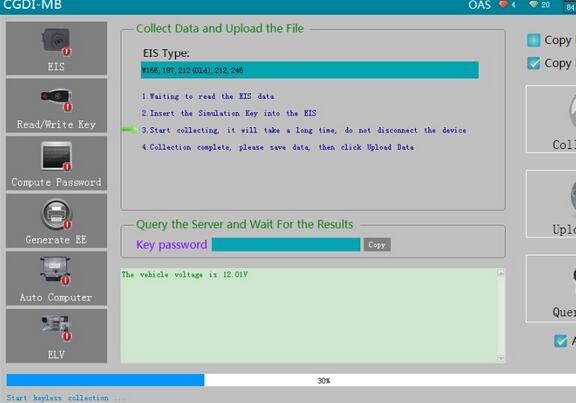
Collected 30%
9-8
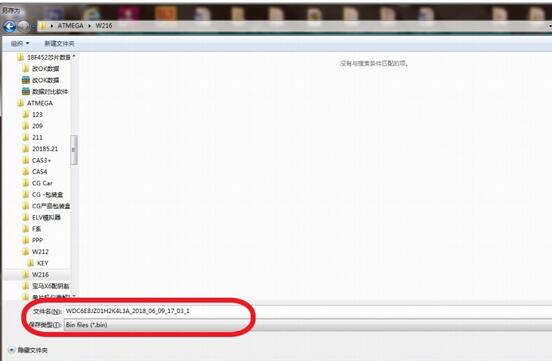
Collection end, save data, default file name
9-9
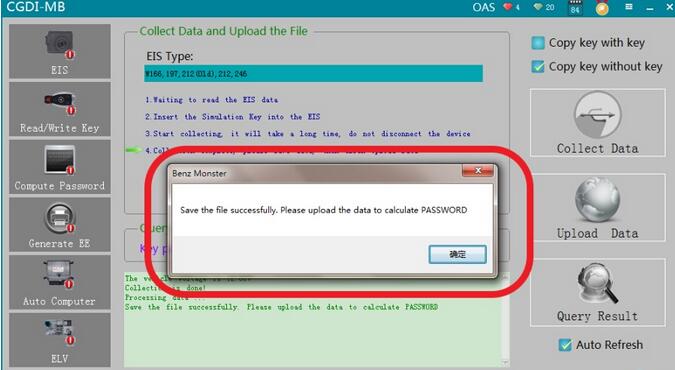
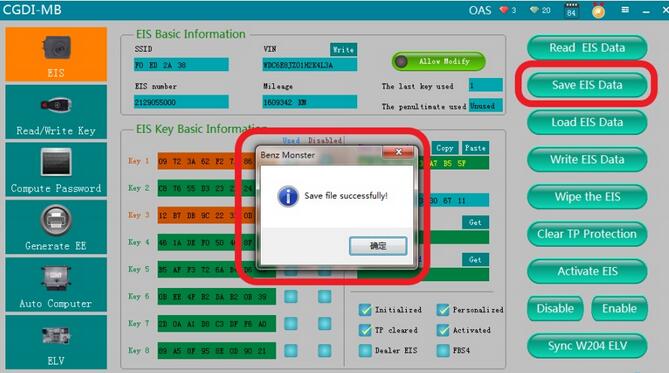
Save data successfully
9-10
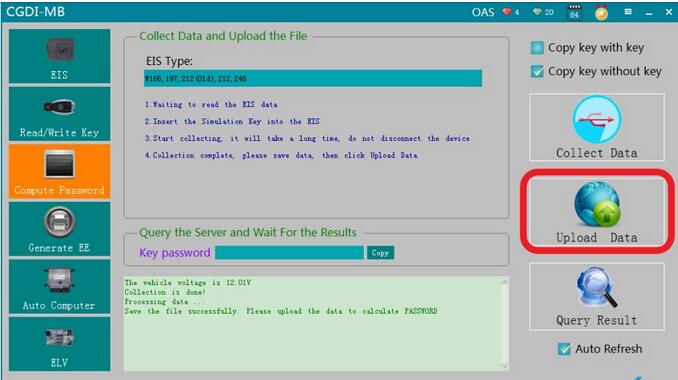
Click“upload data”, open the data just saved
9-11
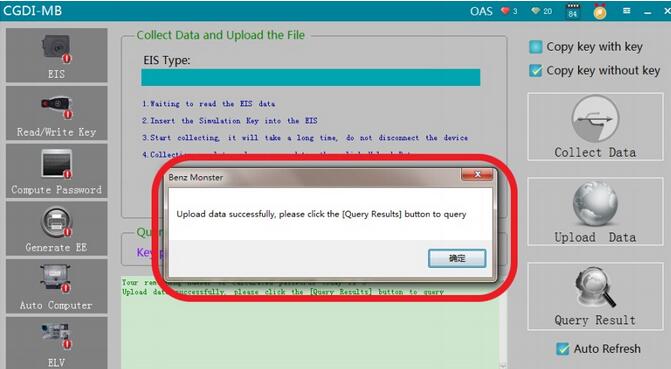
Upload data successfully
9-12
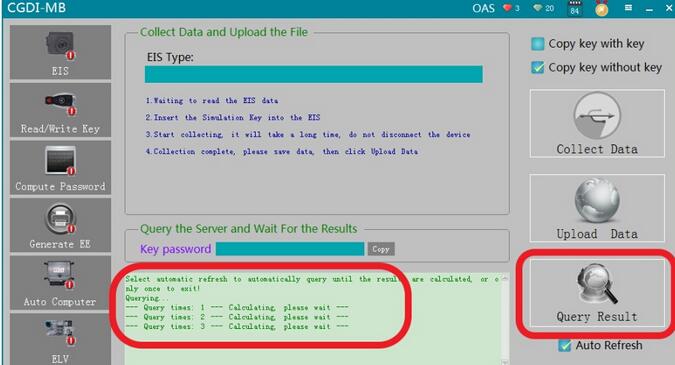
Click“Query Result”
9-13
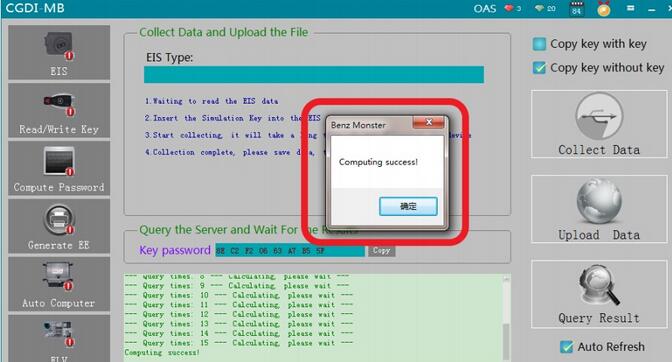
Key password computing success
9-14
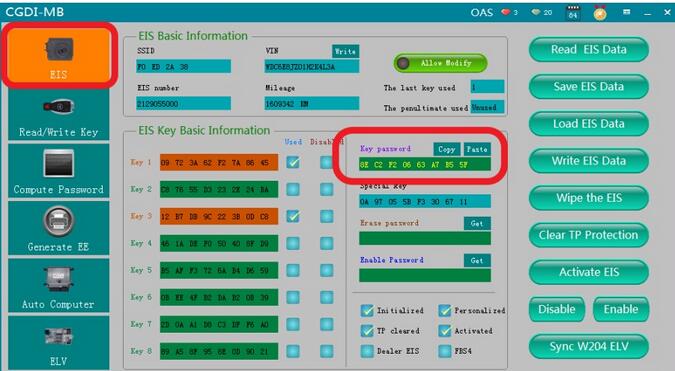
Copy key password
9-15
Go to EIS interface, Copy key password
9-16
Save EIS data, default file name
9-17
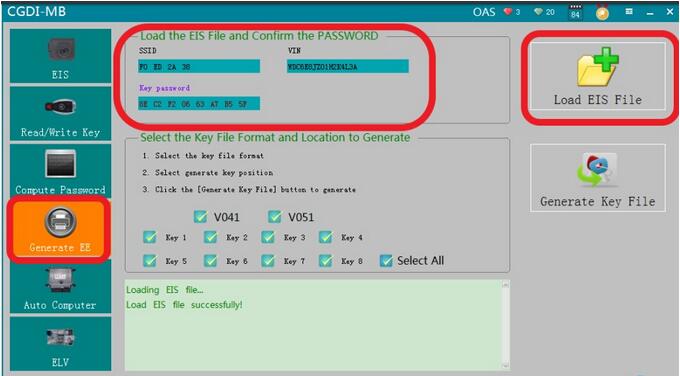
Turn to “ Generate EE”, Check the related information with the EIS data just saved
9-18
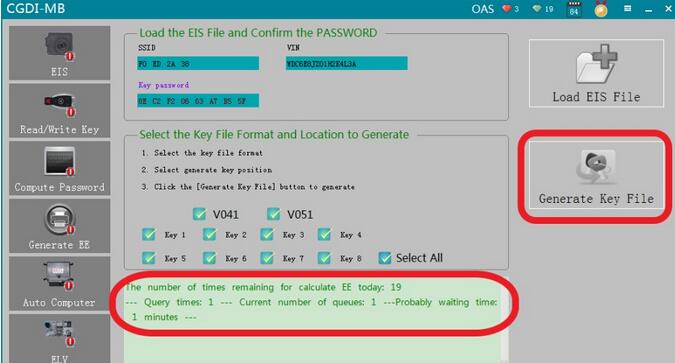
Generate key file
9-19
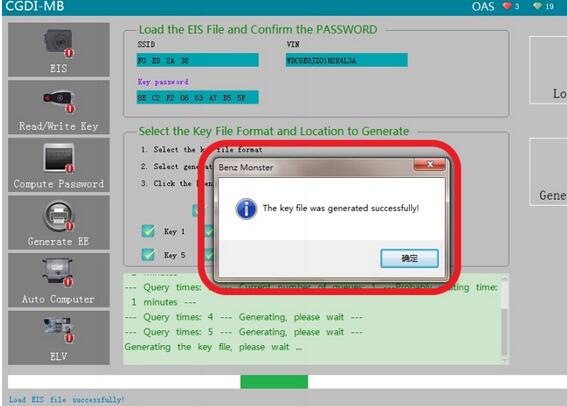
The key file was generated successfully, save it in a new folder
9-20
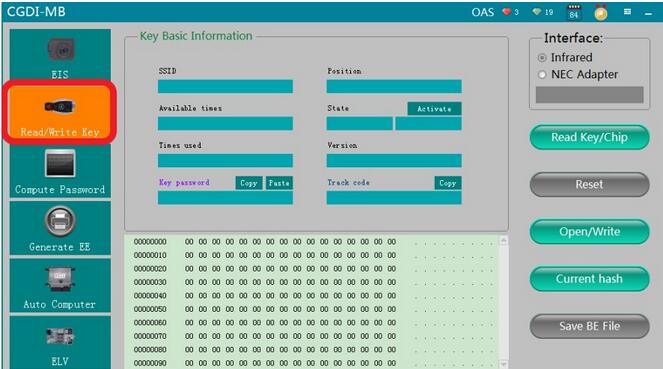
Go to Read/write key
9-21
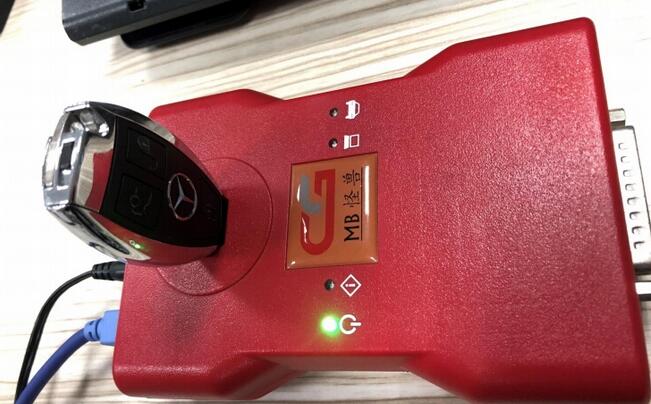
Insert the new key into the Key Key Programmer CGDI MB
9-22
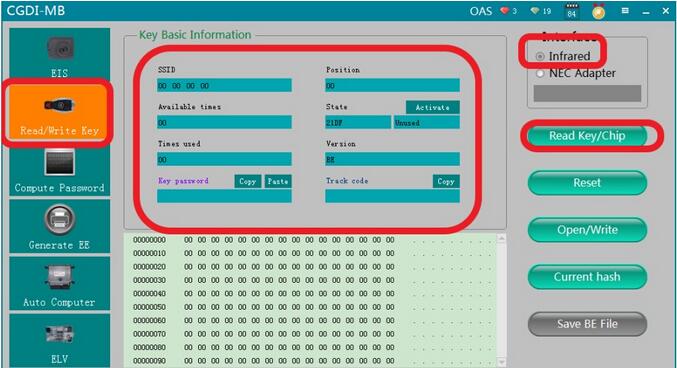
Read key information
9-23
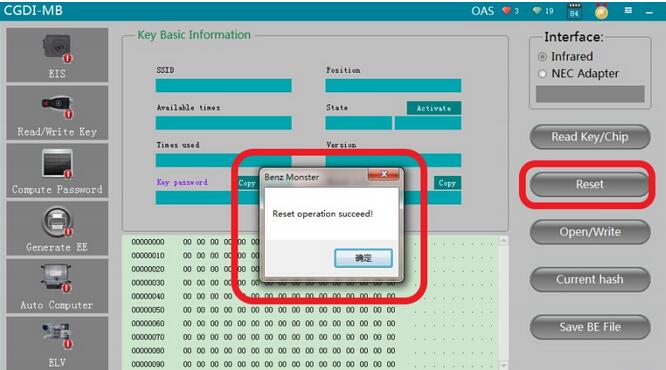
reset key
9-24
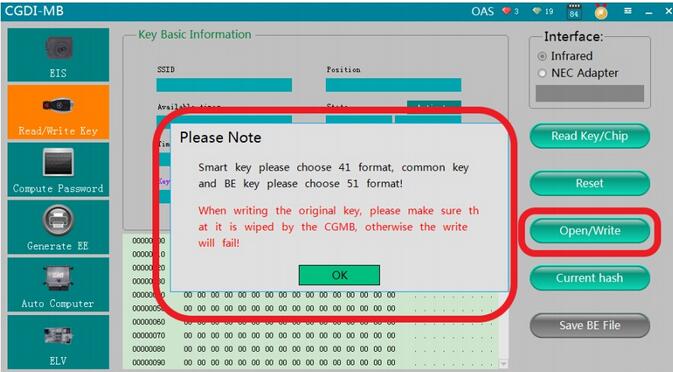
Click“open/write”, please note prompt
9-25
choose an unused key file
9-26
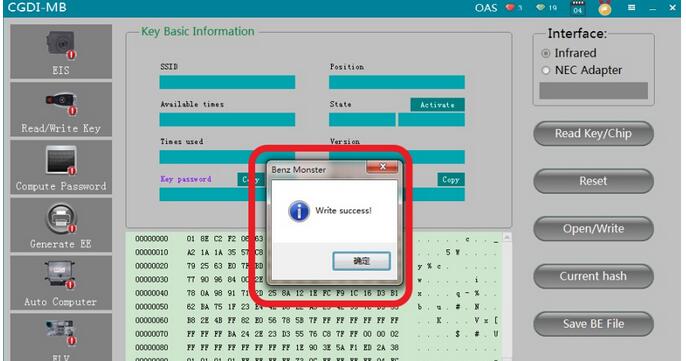
Write success,get on car
9-27
Read EIS data again, show that key position was used
The new key can start car. Program success.
http://avdicommander.com/2018/07/31/program-mercedes-w212-all-keys-lost-with-cgdi-prog-mb/

2018年8月2日星期四

wiTECH 2.0 Will Not Communicate With Any Modules – All Modules Are Red

Theory of Operation:
Below are few different ways communication on a vehicle takes place:
*   Scan tool to the Central Gateway Module (Ex: SGW, TIPM, BCM, etc.)
*   Module to Module
*   Module to Device
*   Device to Module
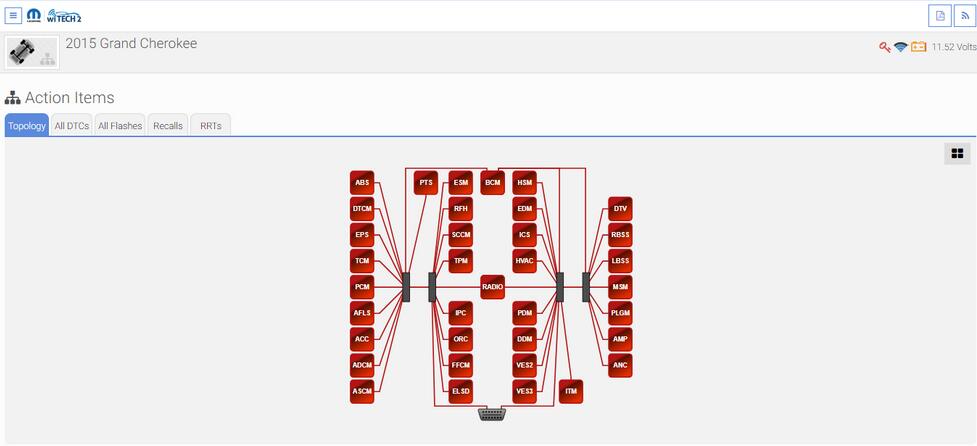
Communication to the vehicle is established with a scan tool, through the Data Link Connector (DLC) to the Central GateWay Module (CGW) over the Controller Area Network (CAN) Bus.
On this vehicle the Body Control Module (BCM) is the CGW between the high and low speed CAN Bus networks (CAN-C and CAN-IHS); and communicates with the scan tool through CAN C.
13-1
The witech 2.0 Bus architecture of this vehicle operates in a “hub” or “star” style, meaning all of the modules are connected at a central point in the Star Connectors. The terminating resistors for CAN Bus are located in the Star Connectors that are part of the body and instrument panel wiring harnesses. In other CAN Bus architectures a vehicle may operate in a “stub” or “backbone” style, meaning there is a single, main line that connects all modules. The terminating resistors for CAN Bus in the “stub” or “backbone” style are located in 2 separate dominant modules that are placed as far apart as is physically possible. The scan tool becomes another module on the vehicle’s networks by acting as the Master Module of all Bus networks while connected to the DLC  and contributes voltage to the operation of the CAN Bus.
The following vehicle interactions listed below will aid in predetermining the type of vehicle communication that is/isn’t available:
NOTE: If the Hazard Lamps and Headlamps are active, this indicates the BCM is functioning and is most likely not the cause of the CAN Bus fault.
*   Operating the Lock/Unlock button of the FOB with Integrated Key (FOBIK) – When any one of the Remote Keyless Entry (RKE) transmitter buttons of the FOBIK are depressed, the onboard transmitter generates a high frequency RF request signal that is received and validated by the Radio Frequency Hub Module (RF Hub). If the RF Hub determines the RKE transmitter RF request signal was generated by a FOBIK that is valid for the vehicle, the RF Hub relays electronic request messages to the BCM over the CAN BUS to invoke the functions or features associated with the request.
*   Opening a Door – The Door Latches contain Ajar Switches that are hardwired to the BCM. The status of the Door Ajar Switch Sense circuit input is monitored by the BCM, which then sends the proper electronic message to other modules in the vehicle over the CAN Bus.
*   Turning the Headlights on – The Headlamp switch uses a single resistor multiplexed output to control the many functions and features it provides. The switch receives a clean ground from the BCM on a Headlamp Switch Multiplex (MUX) Return circuit. The BCM then reads the switch outputs using an internal pull up on the Headlamp/Fog Lamp Switch Signal circuit to control the exterior lighting functions
*   Turning the Hazard Lamps on – The status of the Hazard Switch is continually monitored by the circuitry within the Instrument Panel Switch Bank in the Integrated Center Stack (ICS). The switch receives battery voltage at all times through a Fused Battery Feed circuit, and a path to ground at all times through the Instrument Panel wire harness. Whenever the Hazard Switch is in its latched and lowered position, the hazard warning system is selected and the switch bank circuitry provides a hardwired output to the BCM. When the BCM receives a Hazard Switch input, it then controls hazard warning system operation and flash rate by controlling battery voltage outputs through high side drivers on the Right and Left / Front and Rear Turn Signal Feed circuits.
*   Honking the Horn – Each Horn has a path to ground at all times through its wire harness connection to an eyelet terminal secured to the body sheet metal. The Horns are controlled by a Fused B(+) output received through a relay within the front Power Distribution Center (PDC) Assembly and controlled by the BCM.
During an ignition cycle, the Auto Scanner Tool CAN C Bus network may go into default mode when communication has been hindered with the BCM. In some situations, when this happens the wipers automatically operate in a delay mode and the Headlamps are activated by the BCM. When the ignition is turned off, the vehicle will exit the default mode and operation of the Wipers and Headlamps will stop. When turning the ignition on again, if the CAN C Bus fault is still present, the vehicle will exhibit a no crank, no start condition; and no scan tool communication response to the vehicle.
Possible Causes:
*   INOPERATIVE SCAN TOOL
*   MANUALLY SELECTING THE INCORRECT YEAR AND/OR MODEL WITH WITECH 2.0
*   DATA LINK CONNECTOR (DLC)
*   DATA LINK CONNECTOR FUSED B (+) CIRCUIT OPEN OR HIGH RESISTANCE
*   DATA LINK CONNECTOR GROUND CIRCUIT OPEN OR HIGH RESISTANCE
*   CAN C (+) BUS CIRCUIT OPEN, SHORTED OR HIGH RESISTANCE
*   CAN C (-) BUS CIRCUIT OPEN, SHORTED OR HIGH RESISTANCE
*   POOR TERMINAL CONTACT OR CONNECTOR CONNECTION(S)
*   STAR CONNECTOR
*   ANY MODULE ON THE CAN C BUS
NORMAL CAN C BUS CIRCUIT VOLTAGE TABLE
*   CAN C BUS LOW (-) : 1.5 – 2.5 volts
*   CAN C BUS HIGH (+) : 2.5 – 3.5 volts
*   Difference Between CAN C BUS (+) and CAN C BUS (-) : 0.5 volt
*   CAN B or IHS BUS LOW (-) : 1.5 – 2.5 volts
*   CAN B or IHS BUS HIGH (+) : 2.5 – 3.5 volts
*   Difference Between CAN B or IHS BUS (+) and CAN B or IHS BUS (-) : 0.5 volt
*   CAN C1 or C2 BUS LOW (-) : 1.5 – 2.5 volts
*   CAN C1 or C2 BUS HIGH (+) : 2.5 – 3.5 volts
*   Difference Between CAN C1 or C2 BUS (+) and CAN C1 or C2 BUS (-) : 0.5 volt http://cheapobd2tool.com/2018/07/25/witech-2-0-will-not-communicate-with-any-modules-all-modules-are-red/

2018年7月26日星期四

Where to buy a good Nexiq USB Link 2 at a decent price

Look here: NEXIQ USB Link 2 genuine/clone price, where to buy, bluetooth setup, troubleshooting, compatible application, car list, user manual, etc
What is Nexiq USB Link 2:
It’s the second generation of NEXIQ USB Link for truck troubleshooting.
23-1
Nexiq USB Link 2 pcb:
23-2
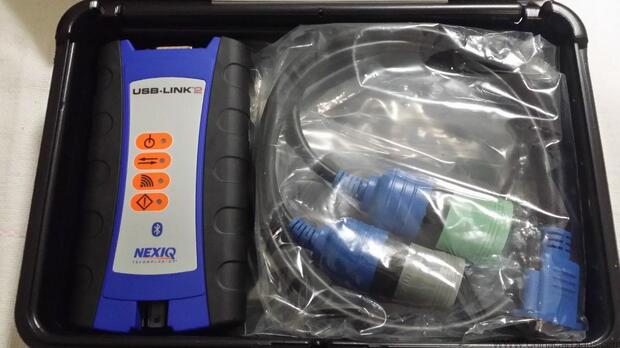
Nexiq USB Link 2 for sale:
There are many Nexiq USB Link 2 for sale on the market, some genuine and some clone.
And for most of you, you may go to Heavy Duty Scanner Nexiq USB Link 2 amazon and Nexiq USB Link 2 ebay as usual. But actually, it’s not a good option to have diagnostic tools there because you hardly ever get professional tech support of diagnosis after sale.
Nexiq USB Link 2 genuine vs clone:
Look here:
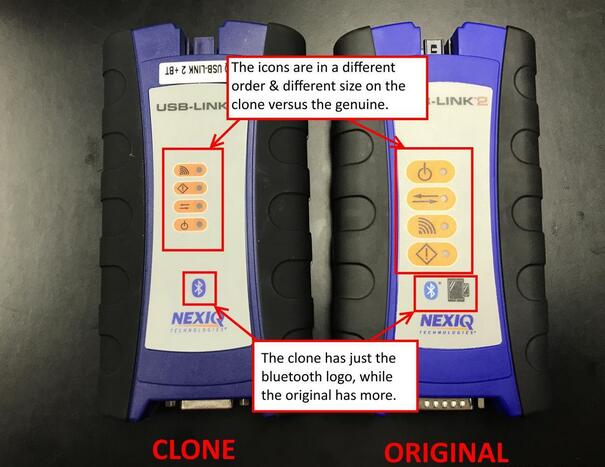
23-3
How to spot a China Nexiq USB Link 2 Clone
Nexiq USB Link 2 price:
The original should be 700 usd and even more. Definitely the original is the best option for trucks troubleshooting. But if you have a budget limit, try to have a good Nexiq USB Link 2 china clone at a decent price: usually less than 200 usd
Nexiq USB Link 2 bluetooth setup:
Get tech support after sale via obd2tool.com
Note that Nexiq USB Link 2 wifi is not available for the clone.
For the different between Nexiq USB Link 2 bluetooth and Nexiq USB Link 2 wifi, look here:
Which to choose,Nexiq 1 or 2? WiFi or Bluetooth?
Nexiq USB Link 2 troubleshooting:
Class 1 Bluetooth provides up to 100 feet of wireless freedom
Flexible configuration supports wired or wireless connectivity
Compatible with applications that diagnose engines, transmissions, ABS, instrument panels and more
Reduce reprogramming times with direct USB connection
Mixed fleet capabilities with broad protocol support
Quick access to vehicle data for maintenance or management reports
Quickly attaches to vehicle’s diagnostic connector
No messy cables to untangle or get in the way with Bluetooth
Easy portability increases flexibility
May be used with desktop PC or laptop
Nexiq USB Link 2 compatible application:
Detroit Diesel Diagnostic Link
CAT Electronic Technician (On-Highway only)
Cummins Insite
International – ServiceMAXX Fleet Pro
Hino eXplorer
Volvo PTT (Premium Tech Tool)
VCAD Elite Mack/Volvo
V-MAC Service Tools
Allison DOC? For PC-Service Tool – Protocols Supported: J1939, J1708/J1587, and J1850
Allison DOC? For Fleets (1000/2000) – Protocols Supported: J1939, J1850
Allison DOC? For Fleets (3000/4000) – Protocols Supported: J1939, J1708/J1587
Eaton ServiceRanger
Bendix ACom
WABCO Toolbox
Freightliner ServiceLink
International ABS
International DLB
International Intune
International IPC v2.02
Pocketfleet Software (PF-Diagnose)
Nexiq USB Link 2 clone application confirmed:
*  Allison (Included!)
*  Bendix 6.3.8.0 (Included!)
*  Detroit Diesel DDDL 7.05 ((Included!)
*  Detroit Diesel DDCT (Included!)
*  Detroit Diesel Calibration Tool (Included!)
*  Eaton Service Ranger 3.2 (Included!)
*  International DLB (Included!)
*  International ICAP, IPTS, NETS, IPC (Included!)
*  International Master Diagnostic (Incluided!)
*  Meritor and Wabco Diagnostics (Included!)
*  Cummins Insite 7.5 (Included!)
*  Hino 2.0.2. (Included!)
*  Caterpillar 2.0.1.0 (Included!)
*  Perkins EST 2010B (Included!)
*  V Macks 2.6.12 (Included!)
*  V Macks Dealer Pro (Included!)
*  Volvo VCADS 2.35.10 (Included!)
*  Toyota Techstream for car (Included!)
Nexiq USB Link 2 car list:
VOLVO TRUCK:FM10, NH565, FH12, FM12, VHD, FH16, FM7, VN, WC, WG, WI, FH565, NH12, FL6, FL7, FL10, FL12, NH525, WX, COMP04, FE, VHD, FH, FM, VM, FM9, F10, F12 , F16, NL10, NL12,VOLVO BUSES: B10B, B10M, B10L, B10R, M10R, B12, B58, B6, B7R, OLYMPIAN, SUPEROLY
VOLVO BUS: B12B,B12M,B12R,B6R,B7L,B7R,B9L,B9R,B9S,B9TL,PREVH,PREVX,
MACK TRUCKS: V-MAC I, V-MAC II, V-MAC III, V-MAC IV, Service Diagnostic
VOLVO CONSTRUCTION EQUIPMENT (CE):
Wheel loader: L110E, L110F, L120E, L120F, L150E, L150F, L180E, L180F, L220E, L220F, L330E, L350F, L60E, L60F, L70E, L70F, L90E, L90F
Articulated Hauler: A25D, A25E, A30D, A30E, A35D, A35E, A40D, A40E, T450D,
Excavator: EC135B, EC140B, EC140C, EC160B, EC160C, EC180B, EC180C, EC210B, EC210C, EC235C, EC240B, EC240C, EC290B, EC290C, EC330B, EC330C, EC360B,EC360C, EC460B, EC460C, EC700C, EC700B, EC700C, ECR145C, ECR235C, ECR305C, EW140B, EW140C, EW145B, EW145C, EW160B, EW160C, EW180B, EW180C, EW200B,EW210C, FC2121C, FC2421C, FC2924C, FC3329C, PL4611
Grader: G710B, G720B, G726B, G730B, G740B, G746B, G780B, G930, G940, G946, G960 , G970, G976, G990
Navistar: ALL Diamond Logic Builder (DLB) ServiceMaxx
International: ALL Intune, MD32,
Freightliner: ALL ServiceLink:cascadia,century,columbia,Coronado,classic,FLDSD,4900FA, 4900SA,4900EX.
HINO: ENGINE:300SERIES, 500 SERIES, CR03_J08E, CR03_J05D, COMMONRAIL(J05E), J05D_US, J08E_US,P11C,VCS, Hibrid, Inverter, Brake(ABS), AT_45043LE
ISUZU_GMC: 1996-1999 NPR Diesel and F Series Include NPR/W 3500, NPR HD/W 4500, This is for 6.0L V-8 Gasoline Engines only, 7.8L 6HK1 Engine
Isuzu: NPR, NPR HD, NQR, NRR, FTR, FVR, FXR with 6HK1 LG4 Engine, NPR, NPR HD,NQR, NRR with 5.2L (4HK1) or 3.0L (4JJ1) Diesel engine. 6.0L V-8 Gasoline Engine
GM: W3500, W4500, W5500, WT5500, W5500 HD,with 5.2L Diesel Engine Only,T6500,T7500, T8500
2018年7月22日星期日

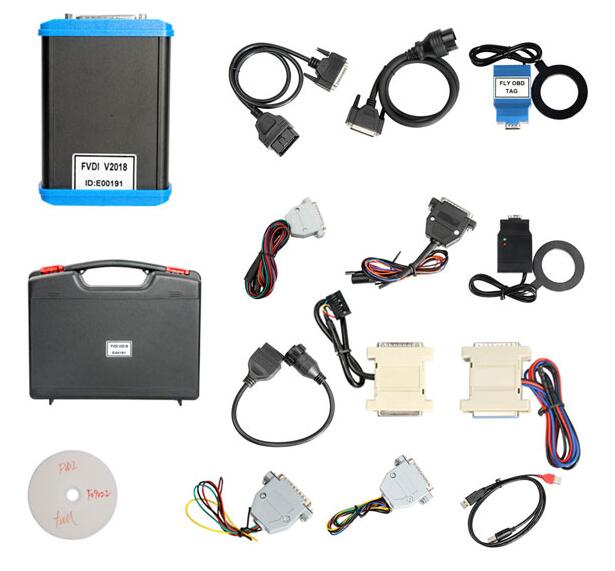
Fly FVDI 2018 user manual Driver download, review, car list

Fly FVDI 2018 is using new server (http://www.flyobd.com) and won’t be locked. FVDI 2018 supports key programmer for BMW, Immo 4th/5th for VW etc. It covers all functions of FVDI2014, FVDI2015, FVDI2016.
FDVI 2018 Reviews:
I ordered one. I had FVDI2014 and 2015 before. This 2018version has the same software versions as the 2015 version except that has updated software for VAG and BMW/Mini. IMMO 4 and 5 key programming is working. Only tested on 2012 Scirocco 2.0 TSi and 2014 Audi A5 2.0T.
Mercedes software still has bugs for odometer correction. W204 did not work.
Overall it is good value for money. Not as good as OBDSTAR X300 DP PAD for keys and odometer but has many better functions like programming and calibrations.
I bought FVDI 18 software for 577€ in 2015.
It works well until now (i use Windows 10 and Windows 7).
Like fvdi 2018 from:
28-1
Fly FVDI 2018 car list:
FVDI 2018 is compatible with AVDI software(all full package):
ABRITES Commander for VAG V18.0 and V24.0 (Volkswagen, Audi, Seat, Skoda)
ABRITES Commander for BMW V10.4 (BMW, Mini)
ABRITES Commander for Mercedes/Maybach/Smart V5.11 and V7.0 (Mercedes, Maybach, Smart)
ABRITES Commander for Renault V5.2 and V6.3 (Renault, Dacia)
ABRITES Commander for Peugeot/Citroen V5.10 and V6.7 (Peugeot, Citroen)
ABRITES Commander for FIAT/LANCIA/ALFA V5.1 and V5.7 (FIAT, LANCIA, ALFA ROMEO)
ABRITES Commander for Opel/Vauxhall V5.8 and V6.6 (Opel, Vauxhall)
ABRITES Commander for Ford V4.9
ABRITES Commander for Chrysler/Jeep/Dodge V3.3 (Chrysler, Jeep, Dodge)
ABRITES Commander for Porsche V4.1
ABRITES Commander for Toyota/Lexus/ Scion V9.0 (Toyota, Lexus, Scion)
ABRITES Commander for Nissan V4.3 (Nissan, Infiniti)
ABRITES Commander for Hyundai/Kia V2.1 (Hyundai, Kia)
ABRITES Commander for Volvo V4.3
ABRITES Commander for Mitsubishi V2.1
ABRITES Commander for DAF V1.0
ABRITES Commander for Bikes/Snowmobiles/Water scooters V1.2
ABRITES Commander for TAG Key Tool V6.2
FVDI 2018 VAG Special functions:
Immo 4th Key Learning/Mileage correction
Instrument – CDC3217/CDC3297/CDC3272 + 24C2
2.Instrument – NEC+24C32
3.Instrument – NEC+24C64
4.Instrument – NEC+24C64 (2013-)
5.Instrument– NEC+24C64 (2012 TFT color display)
6.Instrument– NEC+24C64 (2013 TFT color display)
7.Instrument– NEC+95320
8.Instrument– Motorola 9S12XHZ512(Golf6 MM7 – 2011)
9.Instrument– NEC+95320(Johnson Controls)
10.Instrument– NEC+95320(JCI – 2013 Bora/Jetta)
11.Instrument– Visteon
VW Passat B6/B7/CC
13.Touareg/Phaeton/A8/Cayenne/Bentley 4th immobilizer
14.Audi A1 – NEC+24C64
15.Audi A3/TT/R8 – CDC3217/3297 + 24C32
16.Audi A4 – instrument Crypto RB4 (2001+)
17.Audi A4 –instrument Crypto RB8 (2004+)
18.Audi A6/Q7/Allroad – EZS-Kessy
19.Audi Q3
Immo 5th Key Learning by OBDII
Audi A4/A5/Q5 (Add key, All key lost)
Audi A6/A7/A8, VW Touareg (Add key)
Others Immo type
Audi A4/A6 (immobilizer box) -1997 – KWP1281
Audi A8 (immobilizer box) -1999 – KWP1281
Audi A2/A3/A6/TT/Allroad 1997+ – KWP1281
Audi A4 1997-2002 – KWP1281
Audi A4 2002+ – KWP2000
Audi A8 1999-2002 – KWP1281
Audi A3 – CAN
Audi A6/Q7/Allroard 2005+ – CAN (Support OBD lost all key)
Seat Altea -2007 – CAN
Seat Cordoba
Seat Ibiza (immobilizer box) -1999 – KWP1281
Seat Ibiza 1999+
Seat Leon – KWP1281
Seat Leon -2007 – CAN
Seat Toledo – KWP1281
Seat Toledo -2007 – CAN
Skoda Octavia – KWP1281
Skoda Octavia II -2007 – CAN
Skoda Octavia II 2007+ – CAN
Skoda Superb – KWP1281
Skoda Roomster – KWP1281
Skoda Scout -2007 – CAN
Skoda Fabia (immobilizer box) -1999 – KWP1281
Skoda Fabia 1999+ – KWP1281
VAG (immobilizer box) – KWP1281
VAG KWP1281 Immobilizer – KWP1281
VAG KWP2000 Immobilizer – KWP2000
VW Polo (PCF7935 transponder) – KWP1281
VW Touareg/Phaeton/Bentley/Cyenne Kline – KWP2000
Audi A8 – CAN
VW, Seat, Skoda -2007 – CAN
Porsche Cayenne CAN – CAN
VW Passat B6/CC – CAN (Support OBD lost all key)
VW Passat B6/CC with EDC17/MED17 – CAN (Support OBD lost all key)
VW Golf V with Visteon dash
Audi A4 (RB8 Instrument Cluster) 2004+ – KWP2000
VW, Seat, Skoda 2007+ – CAN (Support OBD lost all key)
VW, Seat, Skoda, Audi with VDO NEC 2009+ – UDS (Support OBD lost all key)
Lamborghini Gallardo -2005
Lamborghini Gallardo 2005+
VW with NEC+95320 or Magneti Marelli with Motorola 9S12 2009+ – UDS (Support OBD lost all key)
Immobilizer box use Megamos – KWP1281
New Beetle – KWP2000
Johnson Controls with 95320 – UDS (Support OBD lost all key)
Remote Learning by OBDII
Support adapt remote key with 09 unit (BCM system and BFM system) (4th immobilizer – UDS dashboard)
ECU Adaptation
ME7.1.1/7.5/7.8 master
ME7.1.1/7.5/7.8 slaver
MED 9.1 single
MED 9.1 master
MED 9.1 slaver
MED 9.5.10
EDC15x
EDC16U1
EDC16U1 master
EDC16U1 slaver
EDC16U31
EDC16U31 master
EDC16U31 slaver
EDC16U34
EDC16CP/EDC16CP34
EDC16CP34 master
EDC16CP34 slaver
EDC16C4 master
EDC16C4 slaver
SIMOS PPD 1.1/1.5(Siemens)
SIMOS benzin(Siemens)
Porsche 5.2/7.8
VVDI2-BMW Special functions:
Key Learning by OBDII
Support CAS1, CAS2, CAS3, CAS3+, ISTAP
Mileage Correction
Support CAS1, CAS2, CAS3, CAS3+, ISTAP
KeyMaker by dump
Support EWS1, EWS2, EWS3, EWS4, CAS1, CAS2, CAS3, CAS3+, CAS4

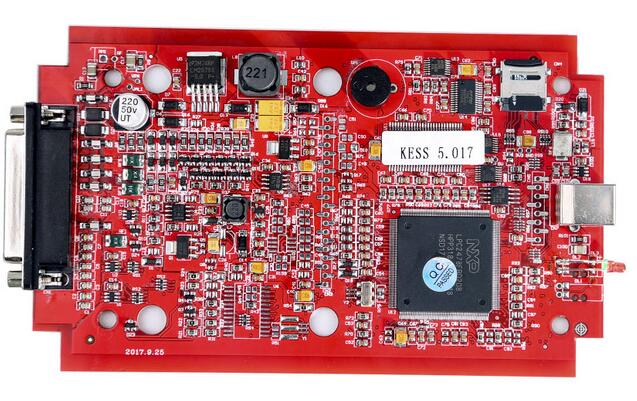
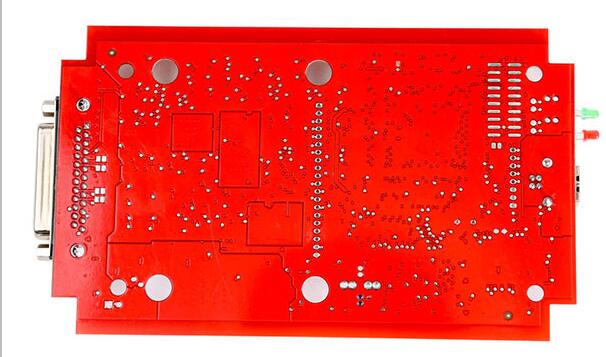
Kess V2 5.017 Rework PCB Manual

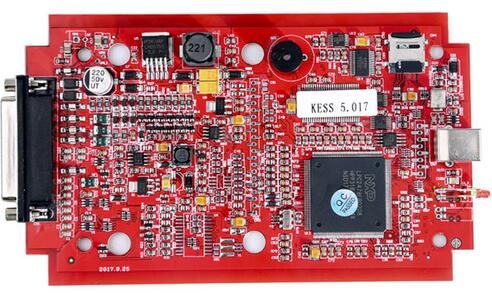
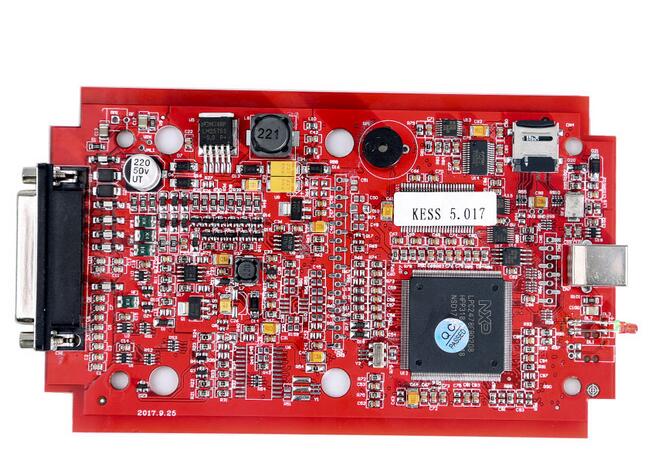
I Share High Quality Pic from KESS V2 which Components need change with GOOD EU components.
On the Pic you can see Text which Component is market with the name of the component!
27-1
Part 1: Kess V2 5.017 Red PCB rework experience
Bought a Kess V2 5.017 china clone, but no luck.
I can try to read but writing is sometimes danger.
power supply for akku. When I write flash, the ecu need a lot of power.
Searched a lot… thought i should rework the inner board.
Then i did something…
Transistors:
BCR112
MMUN2113
BC817
Murata filters:
NFE61PT472C1H9L (connect ground for all of them)
Capacitors:
1uF – 35V
220uF – 10V
10uF – 16V tantalum
Here is good quality pic from ori pcb
27-2
Finally. It works like a charm.
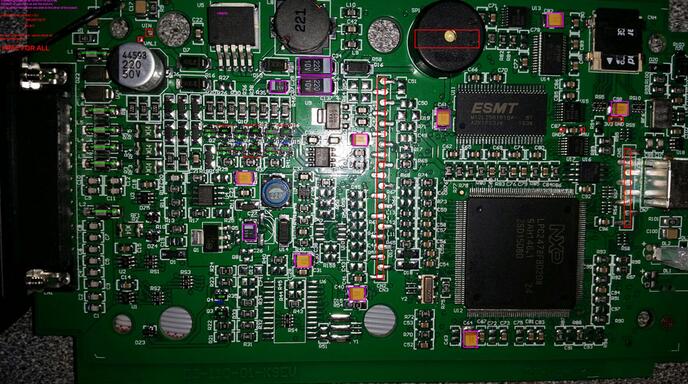
Part 2: Kess V2 5.017 before PCB rework:
27-3
27-4
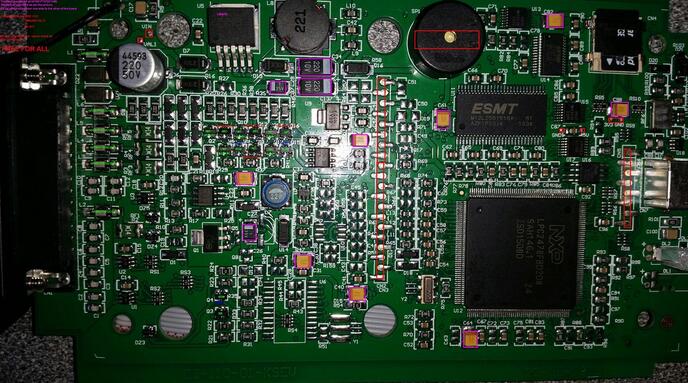
Part 2: Kess V2 5.017 after PCB rework:
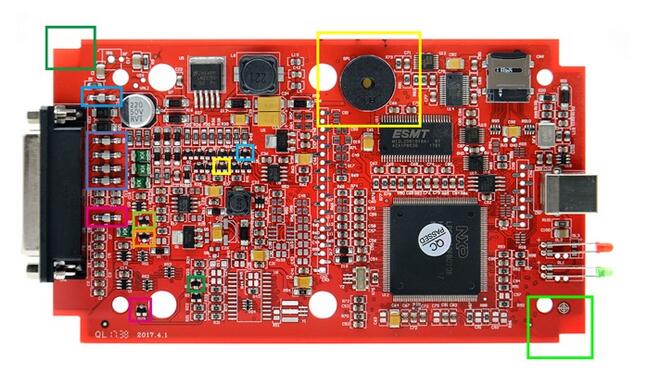
This is what is reworked on Kess (SE137-C1)…Here you go.
1.the left upper corner and the lower right corner notch size is not the same
2.More than  buzzer
3.WFs = Infineon, BCR112 NPN Digital Transistor
4.27E = ON Semiconductor NUP2105LT1G
5.6DW = NXP BC817,215 NPN Bipolar Transistor
6.A6c =MMUN2113LT1G / MMUN2113LT3G
7.K5B = BC807-25-7-F PNP Bipolar Transistor
8.Using imported Japanese Murata filter NFE61PT472C1H9L
27-5
27-6
27-7
100% Tested OK.
Remind: Rework the KESS V2 has certain requirements for the operator’s qualification and skill.
For the beginners, you are advised to use the HQ online version Auto ECU Programmer KESS V2 V5.017 like the following ones.
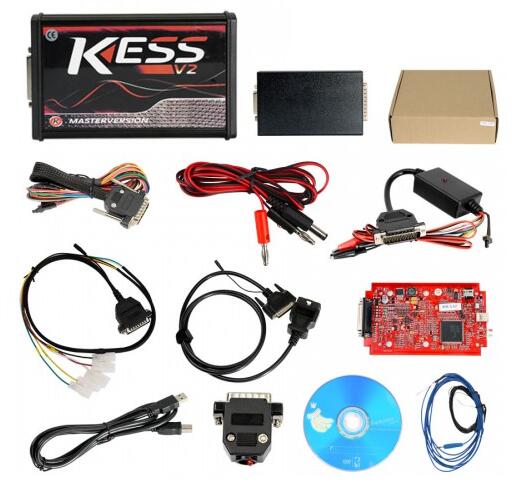
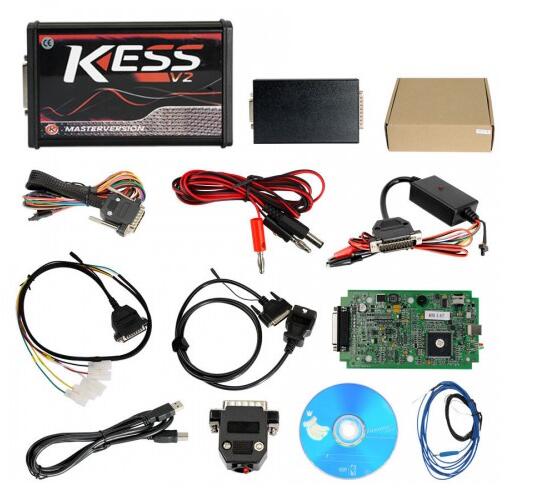
HQ Kess v2 5.017 hardware:
Bellow ones won’t be locked if connecting to internet.
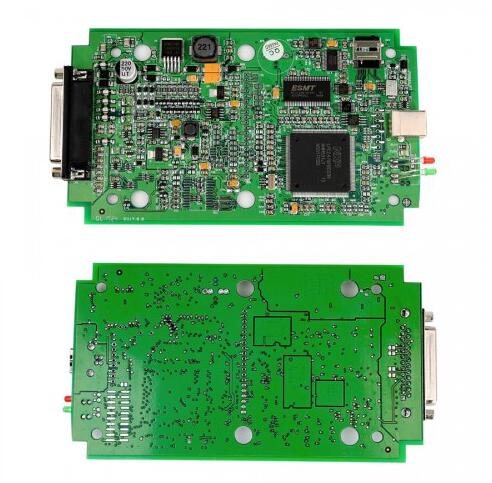
1).  Kess v2 5.017 with green PCB
Works with 140 Protocol
No Token Limited
27-8
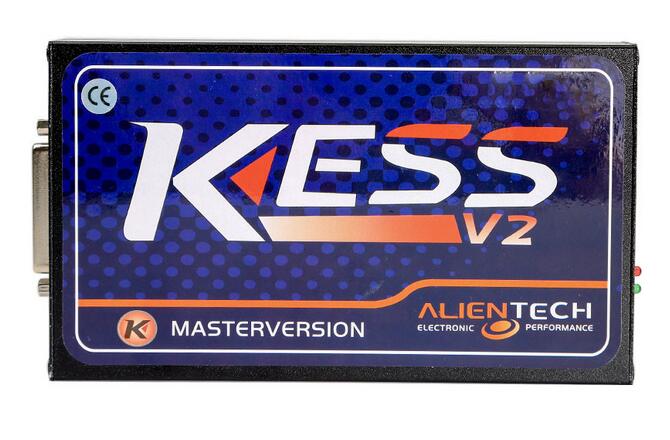
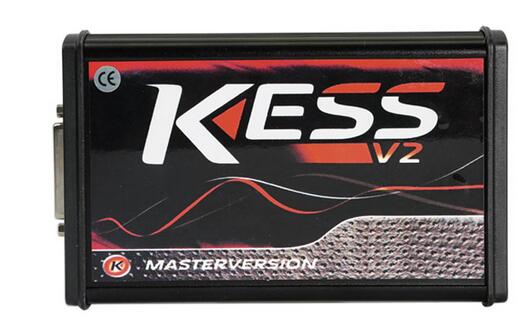
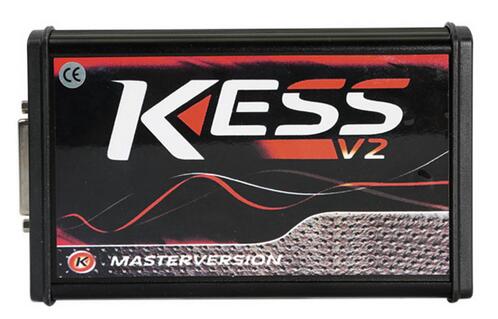
2). Kess V2 5.017 online version main unit
27-9
27-10
3). Kess v2 5.017 online version with red PCB
27-11
4) Kess V5.017 EU Version with green PCB, Support Online EDC17 Protocols
27-12 27-13 27-014 27-14 27-15
Conclusion:
All of the above Kess V2 5.017 from OBD2TOOL are almost the same in the price and functions, what the difference are the PCB color and manufactures.