Since the introduction of
OBD II
and leading up to modern Hybrids and EVs, computers and software in
cars have been expanding at an exponential rate.In-car software is
becoming one of the leading needs for service, and updating
software may be the only way to fix some of these issues:
* Drivability
* Fuel Efficiency
* Power Loss
* Fault Codes
* Durability of Mechanical Parts
The Programming and Coding function is used to re-flash the vehicle
control modules, it allows you to update the computer software on the
vehicle to the latest version, as well as to reprogram adaptive data for
certain components after making repairs or replacements.
NOTE: The
Autel OBD2 Scanner
programming function can only be applied through connection with the
J2534 programming device, which serves as a PassThru interface to
establish communication with and transfer data to the vehicle’s ECU.
Available programming or coding operations vary by the test vehicle, and only the available operations display in the menu.
There are two general types of programming operations:
A. Coding – also known as Teach-in Program, Component Adaptation or
something similar, is used to reprogram adaptive data for vehicle
control modules after repairs or replacements of vehicle parts.
B. Reprogramming Operations – downloads new version of software
subscription from the on-line server database through internet access
(this procedure is done automatically when the MaxiSys display tablet is
connected to the internet, so there is no need to check for software
subscriptions yourself), and reprograms the newest software version to
the vehicle’s ECU.
NOTE: Ensure that the display tablet is connected to the Internet before applying the
ECU Programmin function, so that the display tablet is able to obtain access to the manufacturer’s server for update service.
Selecting the Programming or Coding function opens a menu of
operation options that varies by make and model. Selecting a menu option
either shows a programming interface or opens another menu of
additional choices. Follow on-screen instructions while performing the
programming or coding operations.
How and what information is presented on the screen varies according to the type of operation being performed.
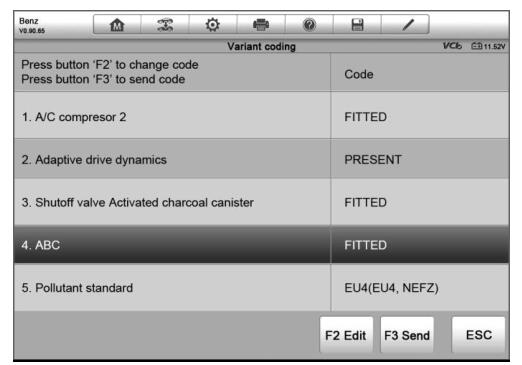
Variant Coding

The main section of the
Maxisys Elite Variant Coding screen displays a list of vehicle components and the coding information which mainly consists of three parts:
1. The top line on the list displays the instruction of how to use the
functional button at the lower right corner of the screen to manipulate
the coding operations.
2. The second part under the top line of the list displays all
available systems for coding on the left side, and the coding data or
value on the right side.
3. The bottom line of the main section displays the functional buttons which allow you to manipulate the operation.
Check the vehicle condition and the coding information carefully, and
use the functional button to edit Codes for the corresponding
components, tap Send when you finish edit for all the items. When the
operation is done, an execution status message such as Completed,
Finished or Successful, may display.Tap the ESC button to exit the
function.
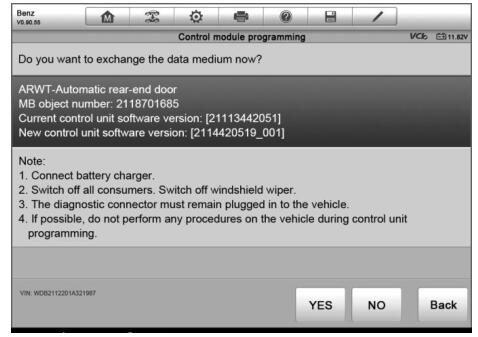
Reprogramming Operation
Typical reprogramming operations require you to input and validate
VIN number first. Tap the input box and enter the correct number, the
programming interface then displays.

The main section of the reprogramming interface provides you certain
hardware version, and current software versions’ information, as well as
the information of the newest software versions to be programmed to the
control units.
Throughout the programming procedure, a series of on-screen operational instructions will display to guide you through
Auto diagnostic tool. Carefully read the on-screen information and follow the instruction to execute the programming procedure.
IMPORATANT: When reprogramming onboard, always make sure the vehicle
battery is fully charged and in good working condition. During
reprogramming there is a risk of having the operation failure if voltage
falls below the proper operation voltage. Sometimes a failed operation
can be recovered, but there is a chance that failed reprogramming could
ruin the control module. We recommend connecting an external battery
charger to the vehicle to ensure a successful operation.
Occasionally a flash update procedure may not complete properly.
Common causes of flash errors include poor cable connections between the
display tablet, VCI, and vehicle, turning off the vehicle ignition
switch before the flash procedure is complete, or low vehicle battery
voltage.
If the process crashes, recheck all the cable connections to assure good
communications and reinitialize the flash procedure. The programming
procedure will automatically repeat if the previous operation does not
succeed.