2018年7月16日星期一

Cummins Inline 7 vs Nexiq USB Link 2

I am going to by by adapter for Cummins but I am confused between Inline 7 and NEXIQ USB Link 2…..
please any advice and what is the difference between both of them.
Thanks
Advice.. here you go
Mikeservice:
Nothing different other than inline comes with inline harness to plug into any Cummins harness if you can’t talk through oem side
Undeadmechanic:
Inline 7 is built by NEXIQ USB Link for Cummins. They slap their sticker on it, and give you the extra harness to plug into the backbone directly.
I ordered an inline 6 to get the extra goodies for benching and they sent a 7 instead. I’m not complaining, lol. I haven’t installed it yet, but it may have a different firmware than the “real” usb link 2. I’ll find out when I get around to installing it since I now have one of each.
silnoreki :
Inline have both blutooth and wifi and slighty faster even when looks same.Im happy with my inline7,just 2 cents.
Sdtruck12:
i can use inline 7 for everything from ddct to jpro and n14. from obd2tool to new works great for programming real fast. Sometimes cummins only like cummins adapters, like n14 m11 570 stuff like that in my experience at least
harobaua:
The two differences I have noticed are:
1. Inline 7 has wifi and bluetooth at the time, nexiq only one at a time.
2. Nexiq 2 has more protocols than Inline 7, for example the Inline 7 does not work with Hino, Toyota, Isuzu.

Which Tool is Best for Truck Diagnostic & Programming

Have search info for a few days ago because I want to learn about how to set myself up with Truck Diagnostic Tool/programming software and the proper tools to do my own work.
Topic: Looking for a good truck performance programmer
Purpose:
I want to be able to read codes on our trucks, address check engine lights, abd lights and whatever else.
Changing parameters would also be nice to do.
Truck:
We have 5 trucks. 3 of mine all have series 60. From ddec 2 up to ddec 4. He has an isx and an Acert. Our trucks are kenworth, Peterbilt and a intl 9200. Would also like cab side on those.
Budget:
I think a $4-500 one should fit the bill.
(Am I able to find everything I need rather than paying some company $4-5k for a tough book and some programming?)
Diagnostic tools looking for trucks:
I have seen a nexiq also the new NEXIQ USB Link 2 and a drewlinq. I think they all serve the same purpose?
Recommendation for hookup: (credits to Samsquantch84)
Laptop: You can pick up a used Lenovo T410 on the web for like $200. They are durable laptops not the best battery life. but get one that has an i5 processor. They are more than fast enough. If you get a laptop that is a little under powered it makes the programs run slow which is really annoying for doing diagnostics. They are pretty rugged laptops.
Equipment: Definitely the best solution is to buy an authentic Nexiq usb link one or two. But if within your budget, a good Nexiq clone of high quality (now called VXTRUCK) should be OK. It’s $200 around. I have to tell you, you need have luck with Chine clone coz you may have nothing but issues with the clone. Go to a good man of his word to trust.
The only real difference between the old one and the new one is the two is that the usb link two supports newer vehicles like ghg17. You probably won’t need it.
Also be careful buying one online unless it is a reputable source. There are some really good looking clones available that are deceiving. obd2tool.com is a supplier of the HQ NEXIQ USB Link and has great support so that is the only source I recommend. I have used it to program a new chip. Success.
22-1 22-2 22-3
Software: As far as software goes. Find Detroit DDDL, Cat ET 2017, Cummins insite 8.1 and you should be good to go. All are easy to get for free from forums or other place.  Also, have a try with crack versions tested by professionals. If you start getting into new Pete’s or kenworth’s like 2012’s(my date’s might be alittle off) and up paccar esa might be handy as well. It connects to the body controller side and allows you to control things like if you install led headlights in a truck that had incandescent you have to change a setting in the cecu for it to work. Also keep learning. There is so much help and information available on this forum from some of the right people. you will learn who they are. Congrats on trying to better your self. and if you have any questions just ask. International uses diamond logic build for the cab side. It’s not the most user friendly software, just like their trucks, who in their right minds uses straight thread o-ring to push to connect air fittings…errrrrr. Also you can go on
quickserve.cummins.com and register for a free limited owners plan which gives you access to parts and service manuals for up to 5 engine serial numbers for free. and dependent on your peterbilt and kenworth dealers you can register with them your vin numbers to a fleet e-cat. It gives you access to look up your vin numbers and view wiring diagrams. It can come in handy.

2018年7月7日星期六

Caterpillar SIS 2018 CAT SIS 2018

2-1
There are 2 options for you to choose before order please:
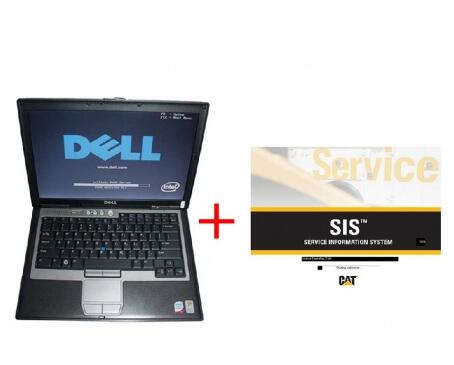
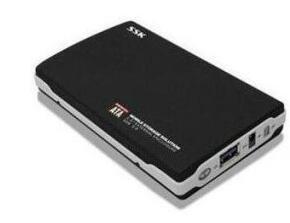
1. Software is in a 320G hdd before shipment, the customers need to install it and active it in the laptop by themselves after receive the hdd.
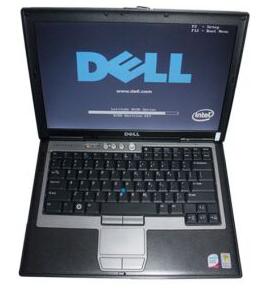
2. Software would be installed well in a second hand dell d630 laptop before shipment, you could use it directly after you receive the dell D630 Laptop.
Languages: English, Spanish, Italian, Chinese, Mexican, German, French
OS: VISTA, Win7 x32, Win7 x64, Windows 8 x32, WinNT, WinXP
Date of update: 1/2018
The Caterpillar SIS 2018 (3D pictures) complete set contains the full information on spare parts, repair, electric circuits and etc. SIS has been tested using Microsoft Internet Explorer 5.5/6.0 on these platforms: Windows 2000 & Windows XP, VISTA and Windows 7.
SIS is the electronic service tool that Caterpillar dealers, customers and employees rely on for their parts and service information needs. SIS provides information for all Caterpillar machines and engines from 1977. SIS is available on the Internet, DVDs and a network version based on the DVD standalone application.
CAT SIS Web is updated continually and is the most complete and up to date version of SIS. SIS DVD and Network SIS use the same information that is located on the monthly data DVD’S. The time required to stage and ship the DVD’S to Dealer’s and Customer’s accounts for the delay in information that may be available from SIS DVD/Network.
SIS DVD is the standalone version of SIS and is required when the Caterpillar Inc. server for either SIS Web or the Dealer server for Network SIS is not available. Field Mechanics may be the largest group that uses SIS DVD. All three versions of SIS require an Internet Browser to display SIS information.
Caterpillar STW
The Service Technician Workbench is an integrated package of software tools, designed to assist the Caterpillar Service Technician during the machine repair process.
STW provides common installation of the following service software applications: STW Toolbar (STW Lauchpad), Service Information System (SIS),  Cat Electronic Technician(Cat ET), CBT Component Based Troubleshooting (CBT), Technical Analisis I (TA1) & Technical Analisis II (TA2), and Service Report.
STW Features:
Allows user to send data from SIS, TA and Cat ET to an Electronic Service Report. All information about the repair is in one location.
Allows user to attach Cat ET Warranty Reports to the STW service report.
Allows user to attach digital photos to further document the repair.
A single source of support ? DDS Support Center
Electronic service reports are easier to archive than paper service reports.
Integration between Component Based Troubleshooting (CBT), Service Information System (SIS), Cat Electronic Technician (Cat ET), Flash File Search and Service Report.
The DBS Upload utility increases dealer efficiency by eliminating the need for the technician to re-type data into the service report, already created in DBS. This information is sent from DBS to STW to create a STW service report.
STW Lauchpad
The STW Launchpad allows to you: Conveniently launch Service Software Applications, Manage some common SIS/CBT preferences.
Families/Models/Prefixes
BROOM-ANGLE, SAHL BROOM, BCG
GENERATOR SET, 3516B, EDG
INDUSTRIAL ENGINE, C7.1, G9R
GENERATOR SET, C6.6, LC6
EXCAVATOR, 336F LH, LTP
MOTOR GRADER, 12M 3, N9F
MOTOR GRADER, 160M 3, N9L
ARTICULATED TRUCK, 725C, TFB
WHEEL TRACTOR-SCRAPER, 621K, WTL
ENGINE – MACHINE, C9.3, WYE
EXCAVATOR, M315D 2, CH3
GENERATOR SET, 3516B, JCY
HAMMER, B30, MAY
MOTOR GRADER, 140M 3, N9M
MOTOR GRADER, 12M 3 AWD, N9P
MOTOR GRADER, 12M 3, N9R
ENGINE – MACHINE, C9, SYE
PACKAGE, 3.4B IOPU, CJ3
BROOM-ANGLE, SAHL BROOM, H1W
GENERATOR SET, 3516C, JDH
EXCAVATOR, 336F LH, KGH
MARINE ENGINE, C140-16, P3P
ENGINE – MACHINE, C9, SSE
EJECTOR TRUCK, 730C, TFH
ARTICULATED TRUCK, 725C, LFB
MINI HYD EXCAVATOR, 300.9D, LJ2
MOTOR GRADER, 140M 3 AWD, N9J
EXCAVATOR, 336F H, NAJ
EXCAVATOR, 320E, SHX
WHEEL TRACTOR-SCRAPER, 627K LRC, WTN
BROOM-ANGLE, SAHL BROOM, BAW
EXCAVATOR, M317D 2, CH5
EXCAVATOR, 336E H, HDW
ARTICULATED TRUCK, 730C, LFF
EJECTOR TRUCK, 730C, LFH
MINI HYD EXCAVATOR, 301.7D, LJ4
MINI HYD EXCAVATOR, 302.7D, LJ7
MOTOR GRADER, 160M 3, N9E
ENGINE – MACHINE, C9.3, SYE
ARTICULATED TRUCK, 730C, TFF
WHEEL TRACTOR-SCRAPER, 627K, WTC
EXCAVATOR, 336E LH, JEA
MINI HYD EXCAVATOR, 302.4D, LJ6
MOTOR GRADER, 160M 3 AWD, N9T
ENGINE – MACHINE, C13, T4F
TRACK-TYPE TRACTOR, D6R, WBC
GENERATOR SET, 3516, JCW
MINI HYD EXCAVATOR, 301.4C, LJ3
MINI HYD EXCAVATOR, 302.2D, LJ5
MOTOR GRADER, 12M 3 AWD, N9B
MOTOR GRADER, 140M 3 AWD, N9G
MOTOR GRADER, 160M 3 AWD, N9K
WHEEL TRACTOR-SCRAPER, 621K, WTA
WHEEL TRACTOR-SCRAPER, 623K LRC, WTM
GENERATOR SET, 3516B, JDE
GENERATOR SET, 3516C, JDJ
EXCAVATOR, 336F LNH, MTW
MOTOR GRADER, 140M 3, N9D
EXCAVATOR, 336F LH, PFL
TRACK-TYPE TRACTOR, D6N OEM, SC6
ENGINE – MACHINE, C9.3, SSE
WHEEL TRACTOR-SCRAPER, 623K, WTB
 
STW Service Report
The STW Service Report is a tool to help you collect, report, and organize your service jobs.
– Allows for complete documentation of your repair.
– Reduce duplicate typing of Service Reports
– Easy to read
– Spell check
Easy integration with Dealer Business System (both DBS and DBSi):
Download header information from DBS
Upload service information to DBS after your job is completed
Collect information from other service tools, including:
Parts lists from SIS
ECM summaries and reports from Cat ET
Inspection lists from Technical Analysis (TA)
 
Component Based Troubleshooting
Component Based Troubleshooting (CBT) helps the technician troubleshoot symptoms and codes for Caterpillar engines and machines. After identifying a symptom, the technician is presented with a list of components that, if not operating properly, may cause the symptom. By using the information provided for each component, the technician can identify the root cause of the symptom and fix the problem. The technician is also presented with a list of available ECMs and codes for the selected model to troubleshoot diagnostic codes. In addition, Heavy Duty Truck Scanner gives the technician links to related information for symptoms and codes in the Service Information System (SIS).
 
Total: (Caterpillar SIS 2018 )
Caterpillar Disc #1: EXCAVATORS, OEM PRODUCTS
Caterpillar Disc #2: ELECTRIC POWER GENERATION
Caterpillar Disc #3: MARINE ENGINES, PETROLEUM PRODUCTS, TRUCK ENGINES
Caterpillar Disc #4: INDUSTRIAL ENGINES
Caterpillar Disc #5: EXCAVATORS, OEM PRODUCTS
Caterpillar Disc #6: PIPELAYERS, TRACK TYPE TRACTORS
Caterpillar Disc #7: INTEGRATED TOOLCARRIERS, WHEEL TYPE LOADERS, WHEEL TRACTOR SCRAPERS
Caterpillar Disc #8: WHEEL TYPE LOADERS
Caterpillar Disc #9: ARTICULATED DUMP TRUCKS, LOAD HAUL DUMP, MACHINE CONTROL GUIDANCE PRODUCTS, OFF HIGHWAY TRUCKS, UNDERGROUND ARTICULATED TRUCKS, ON HIGHWAY TRUCKS
Caterpillar Disc #10: BACKHOE LOADERS, CHALLENGERS, COMBINES, MINI EXCAVATORS, SKID STEER LOADERS, TILLAGE, TELSCOPIC MATERIAL HANDLERS, WORK TOOLS
Caterpillar Disc #11: ASPHALT PAVERS, COLD PLANERS, COMPACTORS, MOTOR GRADERS, ROAD RECLAIMERS
Caterpillar Disc #12: EXCAVATORS
Caterpillar Disc #13: TRACK TYPE TRACTORS
Caterpillar Disc #14: EXCAVATORS, OEM PRODUCTS
Caterpillar Disc #15: EXCAVATORS, OEM PRODUCTS
Caterpillar Disc #16: EXCAVATORS, OEM PRODUCTS
Caterpillar Disc #17: EXCAVATORS, OEM PRODUCTS
Caterpillar Disc #18: EXCAVATORS, OEM PRODUCTS
Caterpillar Disc #19: EXCAVATORS, OEM PRODUCTS
Package including:
Option 1:
1pc x 320GB mobile hard disk
2-2
Option 2:
1pc x second hand Dell D630 (with 320GB HDD)
2-3

2018年7月1日星期日

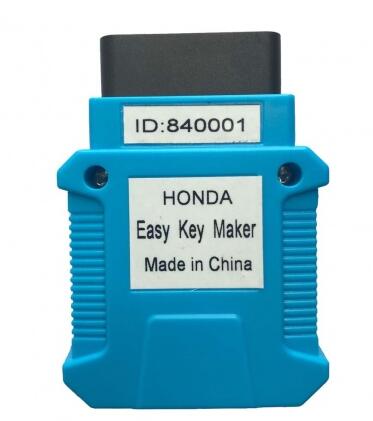
Honda Key Programmer

Honda Key Programmer Cover all Honda/Acura equipped with OBDII-16 socket from 1999 to 2018
17-1
Highlights:
a) Easy to use. Register keys full automatically. User just turns ignition ON/OFF.
b) Register keys fast. Finish registration in minutes.
c) Small package and easy to carry. Can be hold in one hand.
The device is for registering key by OBDII. Cover all Honda/Acura equipped with OBDII-16 socket from 1999 to 2018. Support both transponder key and smart key registration in the following scenarios:
Functions:
a) Add key
b) All keys lost
c) Replace IMMOBI
d) Replace ECM/PCM
e) Replace MPCS/MICU/IMOES
f) Replace smart entry
g) Replace key knob
h) Remote learning
Operation Instructions:
For transponder key.
1.Switch to “IMMO”, and prepare all keys to register.
2.Turn ignition ON to position II(Instrument panel light on but engine OFF), connect programmer to OBDII socket
3.The buzzer periodically short beep with “Di”, Turn ignition OFF.
4.The buzzer periodically short beep with “Di, Di, Di”, turn ignition on without changing key.
5.The buzzer long beep once “Di—“, key registration begins.
6.The buzzer periodically short beep with “Di”, Turn ignition OFF.
7.The buzzer periodically short beep with “Di, Di”, Change another key and turn ignition ON
8.Repeat step F,G, register more up to 6 keys.
9.For last key: First turn ignition ON/OFF following above instructions. When the buzzer periodically short beep with “Di Di”, turn on ignition WITHOUT changing key. Then the buzzer periodically short beep with “Di”, DO NOT turn off ignition and keep ignition on for more than 20 seconds.
10.The buzzer long beep once “Di—“, key registration finished.
11.The buzzer periodically long beep with “Di—“, start to learn remote function. Learning remote function instruction: close all doors, press and release lock/unlock button on key in 4 seconds until door locks lock/unlock. Then learn next remote.(Some cars do not need remote learning, and no buzzer beep tips for learning remote)
12.Turn ignition OFF. Pull out programmer from OBDII. Try to start engine with every key.
For smart key
1.Switch to “SMRT”, and prepare all smart cards to register. Only 1 card in car, and the others out of car.
2.Push one-push-start button, or use ignition key in card, turn ignition ON(Instrument panel light on but engine OFF). If all cards lost and can’t turn ignition on, press and hold one-push-start button. Connect programmer to OBDII socket.
3.The buzzer periodically short beep with “Di”, turn ignition OFF
4.The buzzer periodically short beep with “Di, Di, Di “, turn ignition ON.
5.The buzzer long beep once “Di—“, card registration begins.
6.The buzzer periodically short beep with “Di”, take card out of car.
7.The buzzer periodically short beep with “Di, Di”, take another card in car.
8.Repeat step F,G, register more up to 6 cards
9.For last card: First take card in car following instruction. When the buzzer periodically short beep with “Di”, DO NOT take card out of car and keep card in car for more than 100 seconds.
10.The buzzer long beep once “Di—“, cards registration finished.
11.Turn ignition OFF. Pull out programmer. Try to start engine with every card.
Key Programming Technical Specifications:
a) Voltage & Current Requirements 8V – 18V DC (12V nominal) at 4 Amps (maximum)
b) Vehicle Protocols
– DIAGH
– CAN
– ISO-9141
– ISO-14230
c) Vehicle Connection Molded DLC
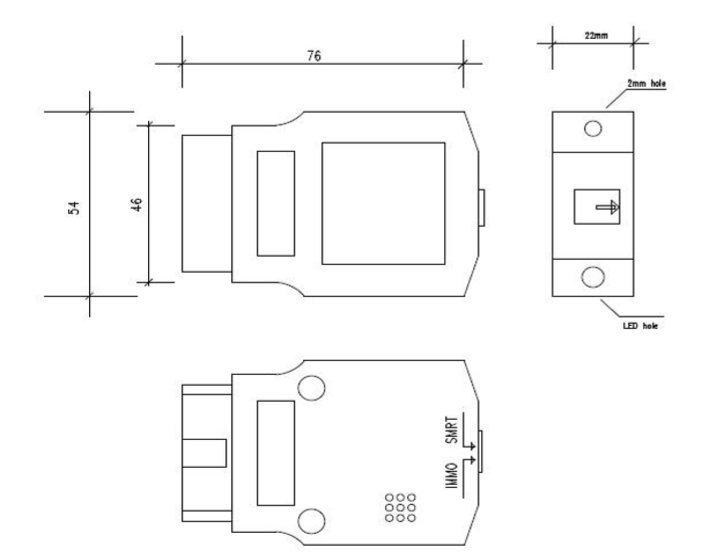
d) Dimensions H:22mm (0.87in) W:54mm (2.13in) L:76mm (2.99in)
e) Weight 50g (1.76oz)
f) Environmental Operating: -20oC to 45oC (-4oF to 113oF) at 15% to 85% RH non-condensing
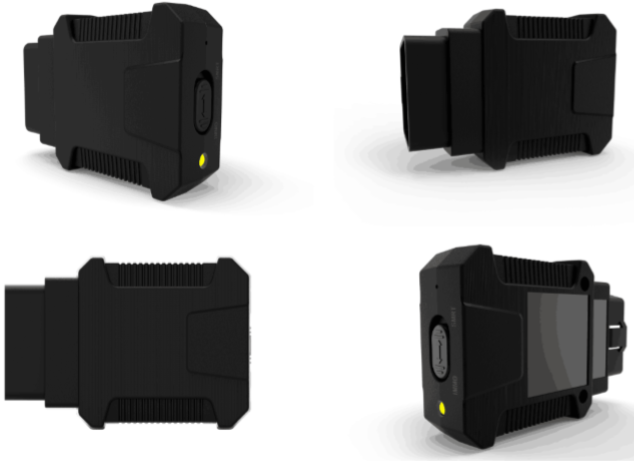
Appearance Detail :
17-2 17-3
a) Key Type Switch
IMMO: Transponder key
SMRT: Smart key
b) LED Status Indicators
ON: Power ON
OFF: Power OFF
c) Buzzer
– Long beep once “Di—” (Beep ON continuous for 3 seconds)
– Long beep periodically with “Di—“(Beep ON for 1 second and OFF for 1 second, and repeat)
– Short beep periodically with “Di” (Beep ON for 100 milliseconds, OFF for 900 milliseconds, and repeat)
– Short beep periodically with “Di, Di” (Beep ON for 100 milliseconds, OFF for 100 milliseconds, ON for 100 milliseconds, OFF for 700 milliseconds, and repeat)
– Short beep periodically with ” Di, Di, Di” (Beep ON for 100 milliseconds, OFF for 100 milliseconds, ON for 100 milliseconds, OFF for 100 milliseconds, ON for 100 milliseconds, OFF for 500 milliseconds, and repeat)
2018年6月22日星期五

How to Solve wiTech MicroPod 2 Software Register Problem

Recently,our customers feedback the problem of wiTech MicroPod register problem.The warning massage “Device with serial number XXXXXX is not registered.Please check the knowledge base to determine how to register a device…” pop-up when run the Chrysler WiTech MicroPod 2 software.So here, OBD2TOOL engineer share the solution of this problem.
14-1
Procedures:
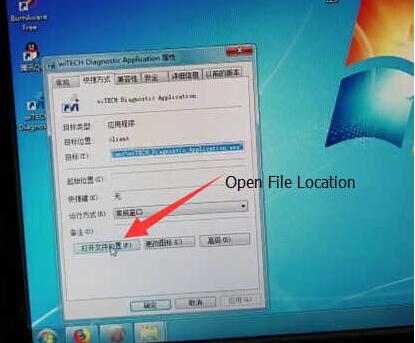
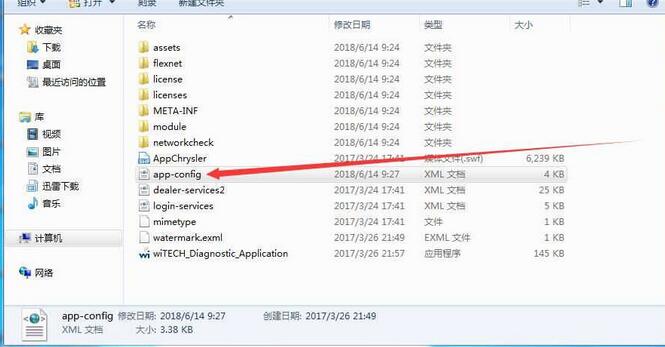
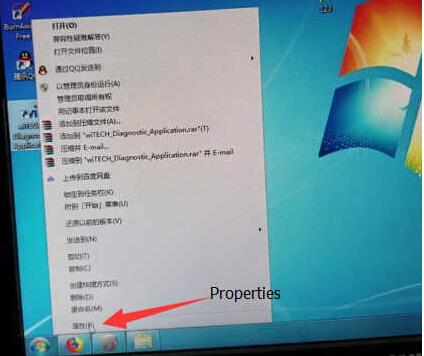
Right click the Professional Diagnostic Tool wiTech MicroPod Software icon,and click the “Properties”
14-2
Click “Open File Location”
14-3
Open the “app-config” file by txt editor
14-4
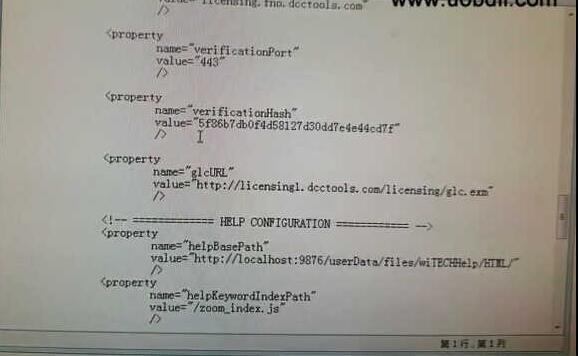
Locate the line with value=”5f86b7db0f4d58127d30dd7e4e44cd7f”
14-5
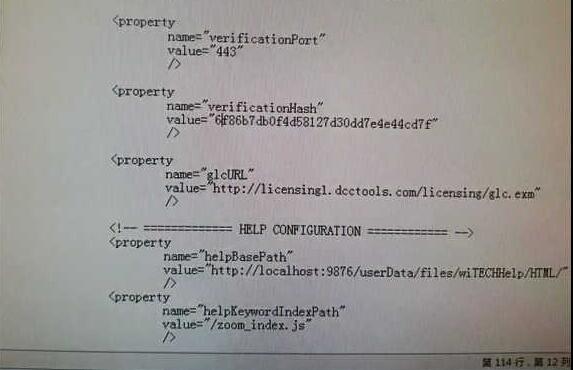
Then change the value ”5f86b7db0f4d58127d30dd7e4e44cd7f” to any other.Here change it to “6f86b7db0f4d58127d30dd7e4e44cd7f”(only change 5 to 6)
14-6
Save
Then run the wiTech MicroPod again
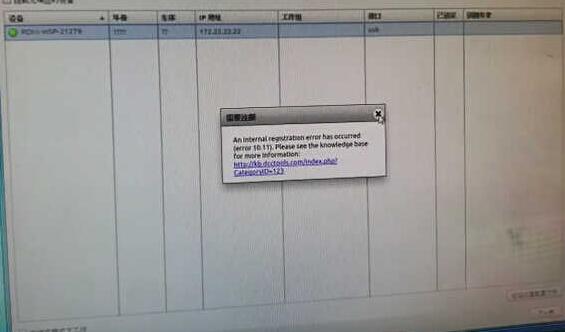
A warning massage pop-up “An internal registeration error has occurred….”,just ignore and close the massage window.
14-7
Click “Next”
14-8
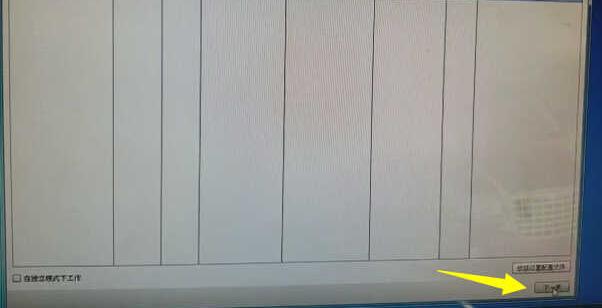
Close the warning massage again,and select “off-line working” and “Finish”
14-9
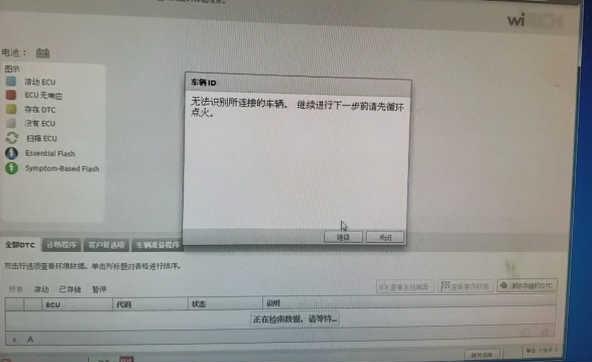
If it prompt you that ”Can’t not identify the vehicle…”,just click the “Continue”
14-10
14-11
Done!

2018年6月12日星期二

The difference of DTS-monaco and Vediamo

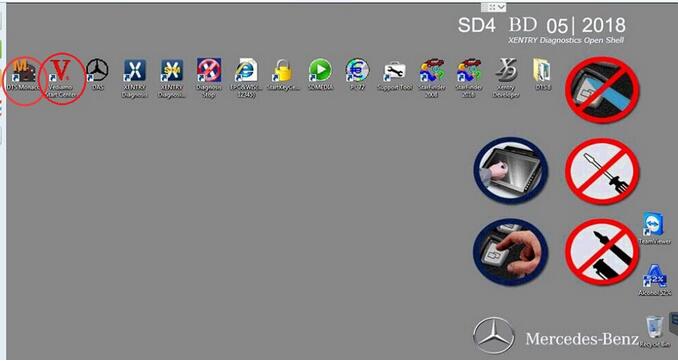
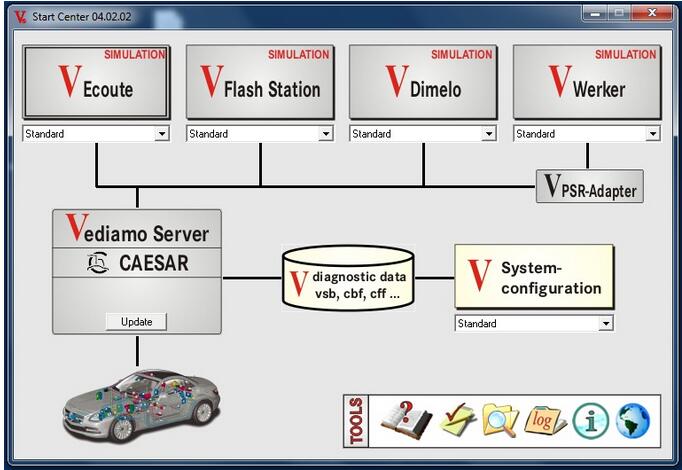
DTS-monaco and Vediamo are added to SDconnect C4 software since 12-2017.
13-1
but what is DTS-monaco and what is Vediamo? And what\s the difference?
Look here:
13-2
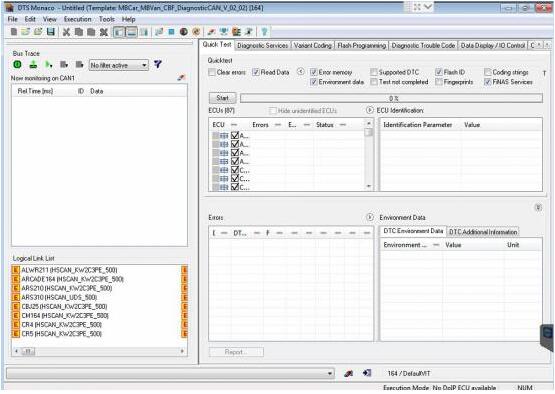
What is DTS-monaco:
DTS Monaco is universal Engineering Tester for Diagnostic and Control Functions of Vehicle ECUs. The name Monaco is derived from Modular Analyzer for Vehicle Communication. DTS Monaco comprehensively covers all tasks in the areas of engineering, testing and preparation of manufacturing tests:
* diagnostics
* analysis
* OBD
* flash programming
* measuring
* parameterizing
* residual bus simulation
* OTX
DTS Monaco is based on standards such as ODX, OTX and UDS
13-3
What is Vediamo:
Vediamo Software is used by the plant engineers to develop diagnosis and engineering software, which is now used by Xentry and DAS, is based on the Mercedes Star Diagnostic super engineering version developed and delivered to the general customer service dealers’ use.
The use of MB super engineering version has no limitation in diagnosis / modification / programming function are open which cannot be through the VEDOC (the original application code changes with flow) can be free to increase or decrease the SA code, modify the objective, for example: the increase of vehicles equipped with SA500 electric folding mirrors, commonly known as the Xentry and DAS development mode: open data project version in 2010 after the release, increase the number of functional limitations. So we will meet the vehicle version is too new to be into the control unit in use, or are unable to do any special modifications to the control unit.
For example: W204/2122012 instrument to modify the area family configuration, or open other resource advantage function. Diagnosis / Mercedes super engineering version of the code with code / modification / programming database using the Xentry database, so the Mercedes Benz super engineering version is determined with the Xentry version, as long as the database is new and can be used in new models.
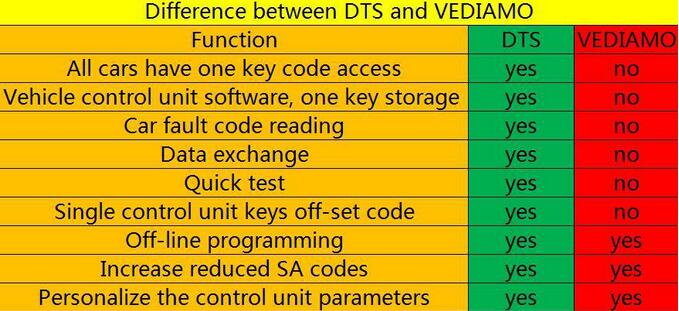
What’s the difference of DTS-monaco and Vediamo:
13-4

DTS-monaco vs. Vediamo
Functions DTS-monaco Vediamo
All cars have one key code access Yes No
Vehicle control unit software,One key storage Yes No
Car fault codes reading Yes No
Data exchange Yes No
Quick test Yes No
Single control unit keys off-set code Yes No
Offline programming Yes Yes
Increase reduced SA codes Yes Yes
Personalize the control unit parameters Yes Yes

In summary, DTS-monaco wins!

2018年5月12日星期六

Do you know what LAUNCH ICARSCAN can do?

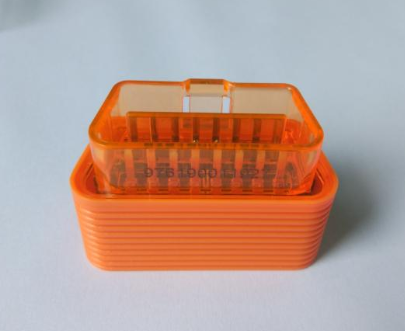
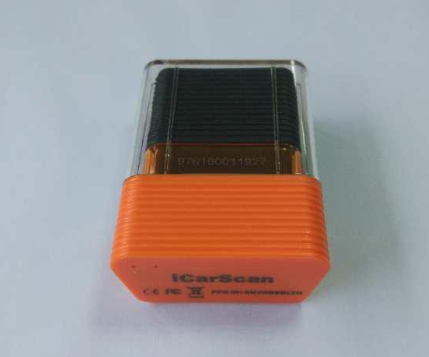
If you buy the actual iCarScan – it comes with a license to download 5 manufacturer’s diagnostics software with 3 special functions . That’s not models – it’s the entire line of each manufacturer (Toyota includes Lexus.. etc.) That is included in the price. You also can download 3 basic “functions” software – things like resetting oil reminders for any car, etc.
icarscan-1
The value of this vs about everything else is – it’s not VIN# limited (Durametic only allows 3 VIN#’s to be used on their DIY version, and the pro version is very expensive), and it covers more than just Porsche.
The software isn’t perfect, but it is pretty darn good, and provides live data streams that are valuable in figuring out why a certain trouble code may be set..
icarscan-2
Plus since the software runs on a cell phone, you can toss this in your door pocket and have diagnostics on the fly whenever you want to. No need to lug a computer around.

http://cheapobd2.com/2018/04/26/do-you-know-what-launch-icarscan-can-do/